
White-Model Video Generation
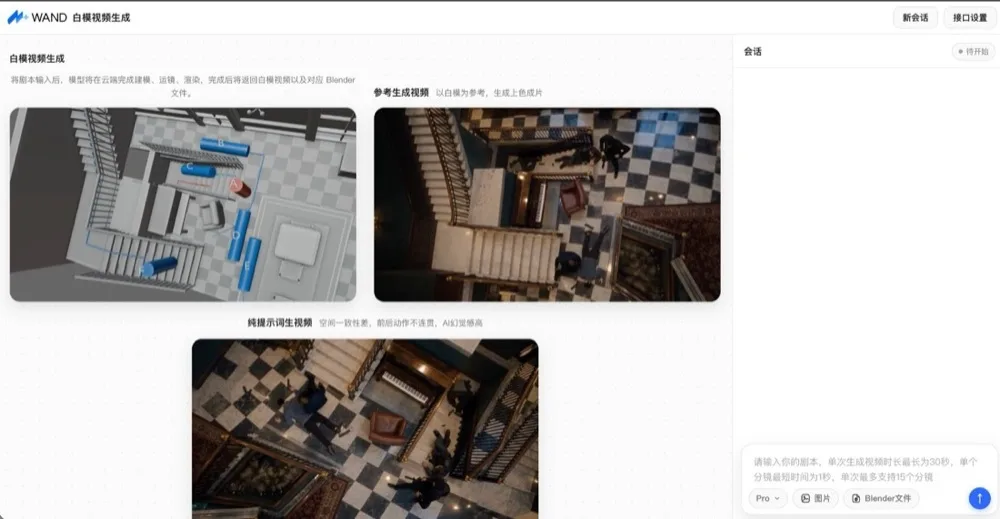
White-Model Video Generation takes a script or storyboard and, in the cloud, automatically handles 3D modeling, camera movement and rendering. It outputs a 3D white-model (untextured previs) video together with the matching Blender project file. Use the white model to lock down scene layout, character action and camera movement first; once confirmed, use it as a reference to generate the final shaded video. The 3D file can be edited and reused.
Typical use cases: film storyboard previs, short-drama production, marketing video production.
Creation flow
| Step | What happens | Output |
|---|---|---|
| ① Input | Script / storyboard text, optionally with reference images or an existing Blender project | — |
| ② White-model generation | Cloud modeling, camera work and rendering (about 5–10 min per run) | White-model MP4 + Blender project |
| ③ Multi-round edits (optional) | Describe changes in the same session / via previous_task_id | A new white-model version |
| ④ Reference-to-video (optional) | Use the white model as a reference for a video generation model | Final MP4 |
Fix the white model first, then render the final video
If the white model isn't right, adjust scene, action and camera at the white-model stage and confirm the result before reference generation — no need to keep re-rolling at the final-video stage.
Two ways to use it
| Option | Best for | Entry point |
|---|---|---|
| Demo | Visual operation, quick trial, a few tasks | Demo website (contact your solutions architect for the URL and API Key) |
| API | Batch tasks, integrating with your own service | POST /v1/videos/generations + POST /v1/videos/generations/query |
Option 1: Demo
1. Configure the API
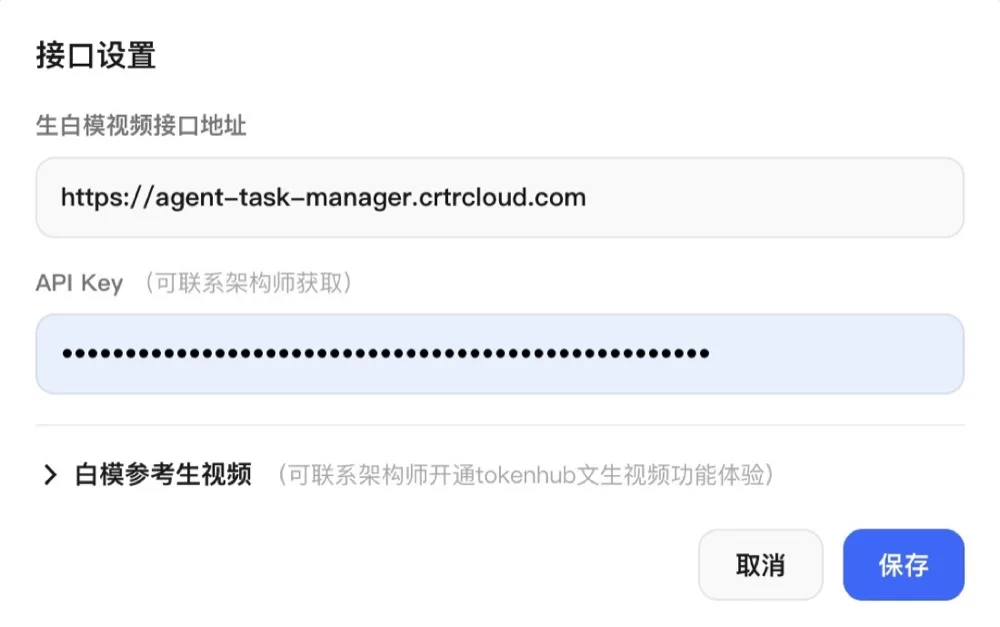
Open the demo website and click API Settings (接口设置) in the top-right corner:
- White-model video API URL: keep the default
https://agent-task-manager.crtrcloud.com. - API Key: obtain it from your solutions architect and paste it in.
- White-model reference-to-video (optional): to generate final videos from the white model, ask your architect to enable TokenHub video generation, then expand this section and fill in the generation URL, query URL (
{id}is the task-ID placeholder — keep it) and API Key. Skip this if you only want white models.
Click Save when done.
2. Submit a task
- Write the prompt: describe the shots and storyboard in the input box on the right — camera position, camera movement, timeline segments and subject actions.
- Attach reference images (optional): up to 6 (PNG / JPEG / WebP / GIF) for character, scene and style reference; you can also upload a previously generated Blender project as the base.
- Choose a model and send:
Flashsuits simple scenes such as short videos and short dramas, optimized for speed;Prosuits cinematic, complex scenes that need fine detail.
Prompt tips
- Split action by timeline (e.g.
0–3s/3–6s) and state the shot size, camera angle (top-down / orbit / rising) and subject behavior for each segment. - A single generation is at most 30 seconds, and each shot at least 1 second (as stated for the demo site).
- When using a Blender project, say what to keep and what to change, e.g. "Use the corridor scene from the project, keep the stairs and character positions, and change the camera to a slow orbit."
3. Preview and download
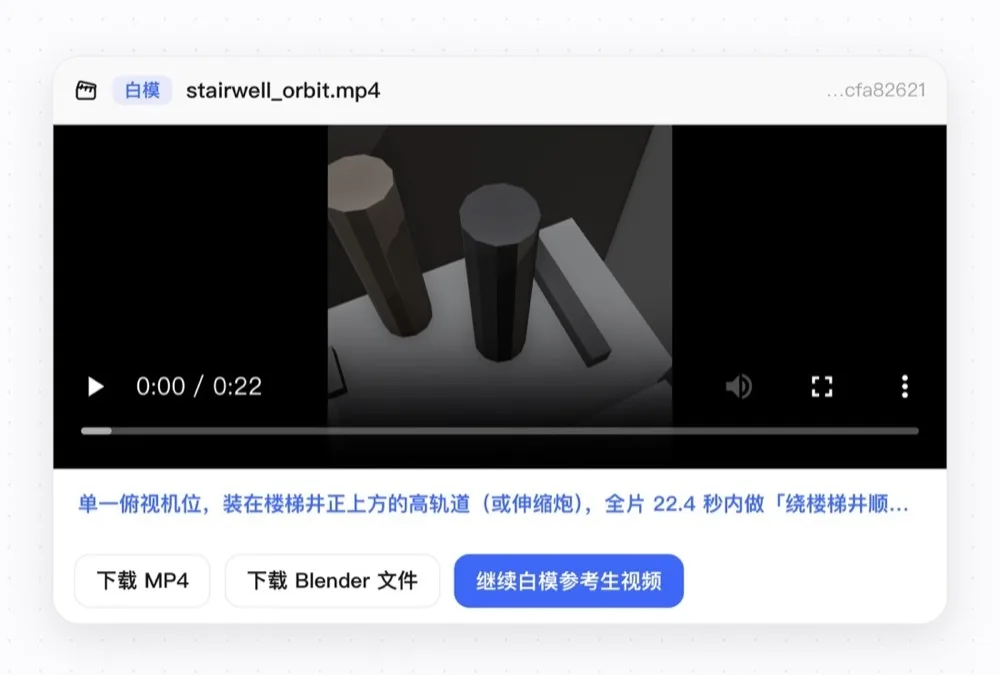
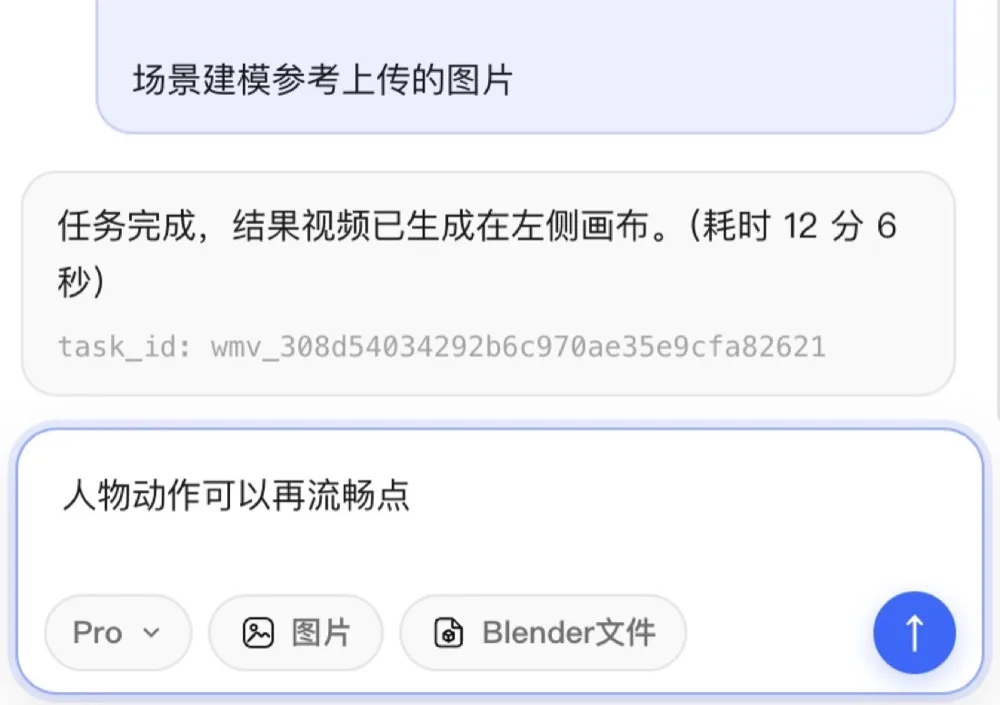
When the task finishes, a white-model video card appears on the left canvas. You can preview it, download the MP4, download the Blender project, or continue with reference-to-video.
Results are only valid on the current page
The demo keeps no session history: after switching to a new session or after 24 hours, results expire and cannot be reloaded. Download the MP4 or Blender project promptly.
4. Reference-to-video from the white model (optional)
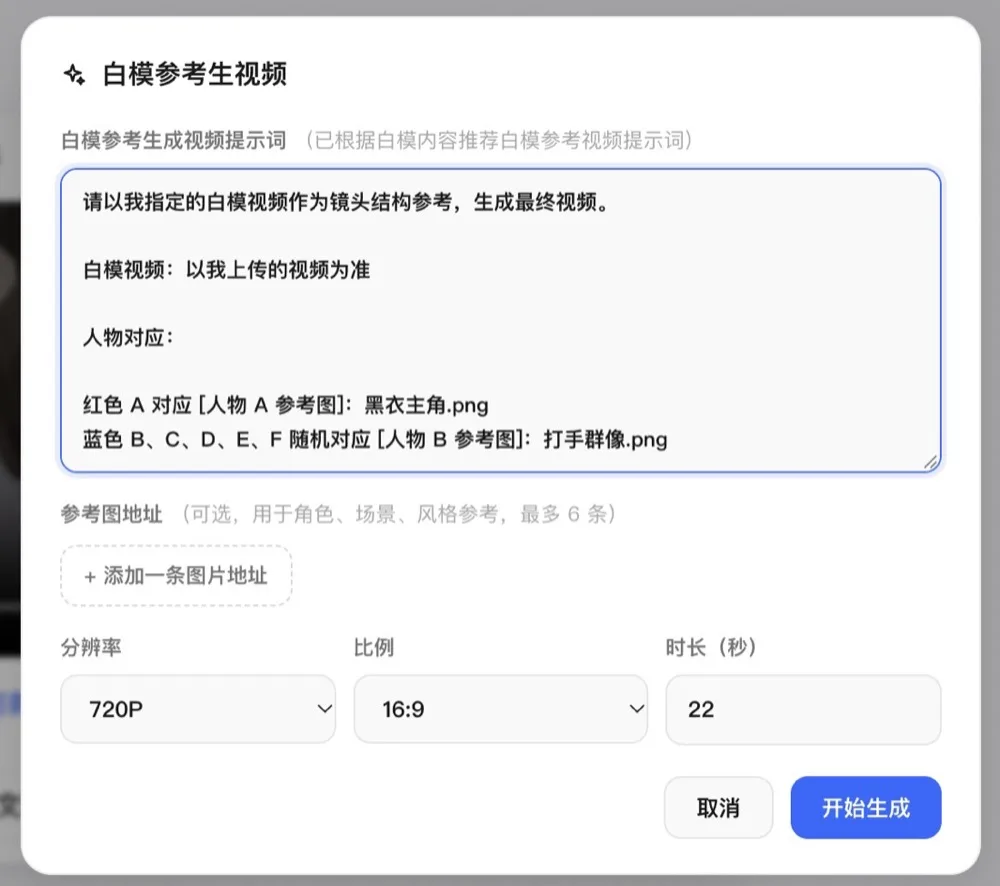
Once you're happy with the white model, open the White-model reference-to-video panel: review the auto-expanded prompt, add character / scene reference image URLs, set resolution, aspect ratio and duration, then click Start. Available values depend on the connected video model.
To tweak the white model again, just type the change in the same session (e.g. "make the character's movement smoother") to start the next round.
Option 2: API
Call flow at a glance
| Step | API | Key input | Key output |
|---|---|---|---|
| ① Auth | — | Authorization: Bearer <API Key> | — |
| ② Create task | POST /v1/videos/generations | model + content[] | task_id, request_id |
| ③ Poll result | POST /v1/videos/generations/query | task_id | status, video_url, blender_url |
| ④ Multi-round edit (optional) | POST /v1/videos/generations | previous_task_id + new content[] | A new task_id |
Both APIs share Bearer auth, take parameters in the JSON body, and use snake_case fields. The create API is asynchronous: an HTTP success only means the task was accepted; status and output URLs always come from the query API.
1. Configure auth
export WAND_API_KEY="YOUR_API_KEY"
export WAND_API_BASE="https://agent-task-manager.crtrcloud.com"
Get the API Key from your solutions architect. Never put it in public web pages, code repositories or logs.
2. Create a task
curl --silent --show-error --fail-with-body \
  -X POST "${WAND_API_BASE}/v1/videos/generations" \
  -H "Authorization: Bearer ${WAND_API_KEY}" \
  -H "Content-Type: application/json" \
  -d '{
    "model": "PRO",
    "content": [
      {"type": "text", "text": "Generate a 4-second white-model previs: a man walks from the corridor into the mansion and locks eyes with a woman; the camera slowly pushes in."}
    ]
  }'
Request parameters
| Parameter | Type | Required | Description |
|---|---|---|---|
model | String | Yes | Only PRO / FLASH (case-insensitive). Do not use the model display name from the website |
content | Array | Yes | At least one item; element format below |
previous_task_id | String | No | For multi-round edits: the task_id of the previous successful task |
content elements
| Parameter | Type | Required when | Description |
|---|---|---|---|
type | String | Always | Only text / image_url / blender_url; anything else returns 400 |
text | String | type=text | Multiple text items are concatenated and passed through; max 4000 characters after concatenation |
url | String | type=image_url or blender_url | Image or Blender project URL, max 2048 characters, at the same level as type |
Request body with a reference image and a Blender project (add either as needed — they don't have to appear together):
{
  "model": "PRO",
  "content": [
    {"type": "text", "text": "Generate a 4-second white-model previs from the reference scene: the character walks forward, the camera slowly pushes in."},
    {"type": "image_url", "url": "https://cos.example.com/ref.png"},
    {"type": "blender_url", "url": "https://cos.example.com/scene.blend"}
  ]
}
Common input mistakes
- Write images as
{"type":"image_url","url":"…"}— not the nestedimage_url.urlform used by other APIs. video_urlinput is not supported, and there are no standaloneduration/resolution/seedparameters — put duration and similar requirements in the prompt.- The example URLs only illustrate the format; replace them with real URLs the service can reach.
Response
{
  "task_id": "1256342408-WandVideo-871172c43c0ae76a910b347b8ec",
  "request_id": "ec7ba810-608d-4865-bd8c-e800ab4f585c"
}
Keep task_id for querying and multi-round edits, and request_id for log tracing. The create response contains no status or output URLs. Store IDs as-is; don't validate them by prefix or format.
3. Query the result
The query is also POST + JSON body, not URL query parameters:
export TASK_ID="TASK_ID_FROM_CREATE_RESPONSE"
curl --silent --show-error --fail-with-body \
  -X POST "${WAND_API_BASE}/v1/videos/generations/query" \
  -H "Authorization: Bearer ${WAND_API_KEY}" \
  -H "Content-Type: application/json" \
  -d "{\"task_id\":\"${TASK_ID}\"}"
Response fields
| Field | Type | Description |
|---|---|---|
status | String | processing / success / failed |
video_url | String | White-model MP4 URL; empty string until finished |
blender_url | String | Blender project URL; empty string until finished |
error_message | String | Failure reason, non-empty only when failed; may be omitted on success |
{
  "status": "success",
  "video_url": "https://your-bucket.cos.ap-guangzhou.myqcloud.com/out.mp4",
  "blender_url": "https://your-bucket.cos.ap-guangzhou.myqcloud.com/scene.blend"
}
Handling by status
status | What to do |
|---|---|
processing | Wait and query again — do not create the same task again |
success | Read video_url / blender_url and download; start the next round if changes are needed |
failed | Stop polling and read error_message; a failed task can't be used for multi-round edits |
Polling strategy is up to the caller
The API defines no polling frequency or URL expiry. The sample below polls every 10 s with a 30-minute overall timeout — both are adjustable client-side example values, not service guarantees.
Full example (Python standard library)
Creates a task and polls until it ends. On create errors or network timeouts it does not retry the create automatically, to avoid duplicate tasks.
import json, os, time
from urllib import request, error

BASE_URL = "https://agent-task-manager.crtrcloud.com"
API_KEY = os.environ["WAND_API_KEY"]
POLL_INTERVAL = 10        # client-side example value
WAIT_TIMEOUT = 30 * 60    # client-side example value


def post_json(path, body, timeout=60):
    req = request.Request(
        BASE_URL + path,
        data=json.dumps(body, ensure_ascii=False).encode("utf-8"),
        headers={"Authorization": "Bearer " + API_KEY,
                 "Content-Type": "application/json"},
        method="POST",
    )
    try:
        with request.urlopen(req, timeout=timeout) as resp:
            return json.load(resp)
    except error.HTTPError as exc:
        raise RuntimeError(f"HTTP {exc.code}; do not auto-retry task creation") from exc


created = post_json("/v1/videos/generations", {
    "model": "PRO",
    "content": [{"type": "text",
                 "text": "Generate a 4-second white-model previs: a character walks from the corridor into the mansion; the camera slowly pushes in."}],
})
task_id = created["task_id"]
print("task_id:", task_id)

deadline = time.monotonic() + WAIT_TIMEOUT
while time.monotonic() < deadline:
    result = post_json("/v1/videos/generations/query", {"task_id": task_id})
    status = result.get("status")
    if status == "success":
        print("video_url:", result["video_url"])
        print("blender_url:", result["blender_url"])
        break
    if status == "failed":
        raise RuntimeError(result.get("error_message") or "Task failed")
    time.sleep(POLL_INTERVAL)
else:
    raise TimeoutError(f"Client stopped waiting; the task may still be running: {task_id}")
4. Multi-round edits
First confirm the previous round is status=success, then call the create API with previous_task_id pointing at it and describe the changes in content. The request returns a new task_id; query that new ID from then on.
export PREVIOUS_TASK_ID="SUCCESSFUL_TASK_ID"
curl --silent --show-error --fail-with-body \
  -X POST "${WAND_API_BASE}/v1/videos/generations" \
  -H "Authorization: Bearer ${WAND_API_KEY}" \
  -H "Content-Type: application/json" \
  -d "{
    \"model\": \"PRO\",
    \"previous_task_id\": \"${PREVIOUS_TASK_ID}\",
    \"content\": [
      {\"type\": \"text\", \"text\": \"Keep the scene and characters; change the camera to a slow orbit from the side and slow down the walking.\"}
    ]
  }"
A multi-round edit does not overwrite the original task
If the previous round is still processing or has failed, the edit returns HTTP 409. To keep adjusting, use the task_id of the most recent successful task.
HTTP error codes
These apply to both the create and query APIs. HTTP errors and status=failed in a query result are two separate layers and must be handled separately.
| HTTP | Meaning | Suggested action |
|---|---|---|
| 400 | Bad parameters: missing required field, unsupported type, length exceeded, unsupported model, etc. | Check PRO / FLASH, the content format, the 4000-char text and 2048-char URL limits |
| 401 | Bearer key not recognized or expired | Check the header and key validity; never log the key |
| 404 | Queried task does not exist | Make sure task_id came from a create response |
| 409 | Previous task not yet successful; multi-round edit not allowed | Query the previous task and edit only after success |
| 500 | Capability not provisioned or internal server error | Keep request_id / task_id and the status code and contact the provider; don't blindly re-create |
- Timeout ≠ cancellation: a client timeout doesn't cancel the server-side task. If you have a
task_id, keep querying; if the create response was lost, check before retrying. - Out of scope: the API defines no cancel endpoint, idempotency key, rate limits, CORS or callbacks. The demo site's 30-second length and 6-image limit are not API constraints.
Billing
The Demo and API integration testing are currently free; billing is expected to start in mid-November. Charges consist of multimodal understanding & execution plus real-time cloud rendering, combined and billed as Tokens (CNY 10 or USD 1.6 per million Tokens). Reference-to-video is billed separately according to the video model you enable.
| Tier | Multimodal understanding & execution (CNY / million Tokens) | Real-time cloud rendering |
|---|---|---|
| Pro | Input 67 · Output 335 · Cache hit 6.7 | ≈ CNY 0.2 / min |
| Flash | Input 16 · Output 80 · Cache hit 1.6 | ≈ CNY 0.2 / min |
| Lite | Input 2 · Output 7 · Cache hit 0.57 | ≈ CNY 0.2 / min |
Example: on Pro, multimodal understanding & execution costs CNY 50 and cloud rendering CNY 2, for a total of CNY 52, billed as 5.2 million Tokens. Official billing announcements prevail.
Notes
- One task at a time: the demo runs a single task at a time — wait for it to finish before starting another. The demo and the API can run different tasks concurrently.
- Duration: the "estimated generation time" on the page is indicative; actual time is determined by the server.
- Key security: keep the Bearer key on the server or in local environment variables, never in public HTML.
- Saving results: demo results last 24 hours with no session history; for the API, download promptly from the URLs returned by the query.