
SCTE-35 and PDT
SCTE-35 is a signal that conveys segment information such as ad transitions, while PDT is a tag that ties HLS segments to an actual date and time. Enabling these two settings and building an ad insertion service are separate tasks.
Division of Roles
| Item | Role | Where to verify |
|---|---|---|
| SCTE-35 | Transition segment signal | Ad markers in the source and the output |
| PDT | Ties segments to an absolute time | EXT-X-PROGRAM-DATE-TIME |
| SSAI configuration | Ad selection / playlist assembly | Main content source, ADS, session and ad settings |
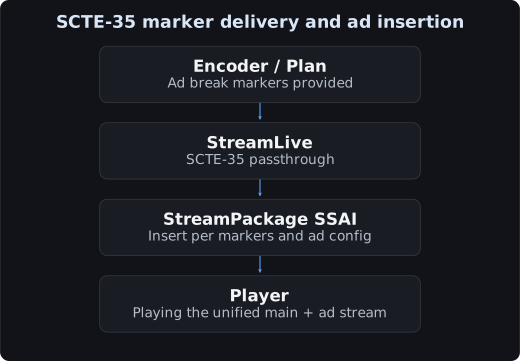
PDT is used for time alignment. Apply it according to the time reference of your ad system.
Prerequisites
- Review the existing channel configuration and the source input protocol.
- Verify that the encoder actually includes SCTE-35.
- Before changing the settings of a production channel, assess the impact of stopping and restarting it.
- Verify SCTE-35 using a source that contains markers, or by injecting events from a Plan.
The official passthrough guide covers SCTE-35 messages in MPEG-2 TS and describes the RTP_PUSH, UDP_PUSH, and SRT_PUSH inputs. Distinguish between passing through encoder messages and generating events from a StreamLive Plan.
Console Configuration
- Stop the target channel, then go to Output Group Setting under Edit.
- On the relevant Output, enable passthrough in Scte
35Setting. - In the HLS family of output groups, enable PdtInsertion and set the insertion interval.
- Confirm that the input, existing templates, and output destinations are unchanged, then save.
- Start the channel and publish the source.
Per the official guide, the outputs that support PDT are HLS, HLS_ARCHIVE, and HLS_STREAM_PACKAGE. Depending on the console version, the setting may appear under the Manifest or the Segment area.
What the API Settings Mean
The following is not a complete modify request, but an example of the relevant fields. Query and preserve the full existing channel configuration before applying it.
{
  "Scte35Settings": {
    "Behavior": "PASSTHROUGH"
  }
}
The fields above belong to that Output. The fields below are included in the HLS remux settings of the Output Group.
{
  "HlsRemuxSettings": {
    "PdtInsertion": "OPEN",
    "PdtDuration": 600
  }
}
PdtDuration is the PDT insertion interval. The example below is 600 seconds; when modifying a channel, apply only the changes needed on top of the current settings.
Verifying the Output
STREAM_MEDIA_URL='https://YOUR_HOST/YOUR_MEDIA_PLAYLIST.m3u8'
curl --fail-with-body --silent --show-error "$STREAM_MEDIA_URL"
The following is an example of the PDT format.
#EXTM3U
#EXT-X-TARGETDURATION:4
#EXT-X-MEDIA-SEQUENCE:100
#EXT-X-PROGRAM-DATE-TIME:2026-09-18T03:00:00.000Z
#EXTINF:4.000,
segment100.ts
When the SCTE-35 messages from the input are passed through, you can verify them as CUE-OUT/CUE-IN or as DATERANGE, depending on the output format.
When testing with a Plan, execution follows the StartType you specify. IMMEDIATE runs right away, while a scheduled event runs at the specified time. Verify successful marker observation separately from successful ADS calls and ad video playback.
Wrapping Up Tests and Official Documents
After finishing Plan trials, check for leftover unnecessary events and the running state of the test channel.