
StreamLive Overview
StreamLive is a service that receives a live origin, processes the video / audio, and sends it to the specified destination. Multiple resolution outputs can be created from a single origin, and this guide delivers the HLS output to StreamPackage.
Role of each console menu and the task order
| Console menu | Items configured here | Next step connected |
|---|---|---|
| Security Group | Allowed list of push public IPs | Selected when creating an input |
| Input | Input protocol, origin address or push address, authentication, A/B inputs | Connected as the input of a channel |
| Channel | Inputs to connect, output groups, transcoding, start / stop, monitoring | Output to StreamPackage / SRT listener / COS, etc. |
| Asset → Watermark | Watermark assets to use | Referenced in the video transcoding settings of the channel |
| Asset → Graphic Overlay | Graphic assets used for screen compositing | Used in the graphic overlay configuration of the channel |
| Usage Statistics | Usage by period | Usage review based on channel execution / output configuration |
Transcoding templates and output groups are not independent video delivery menus, but items connected within the channel configuration. In the basic exercise, proceed in the order security group → input → channel → output group → per-resolution output.
Choosing the input protocol
| Origin connection method | Type to select | What to prepare |
|---|---|---|
| RTMP push from an encoder | RTMP_PUSH / RTMPS_PUSH | Input security group, application name, stream name, required authentication |
| Pull from an RTMP origin | RTMP_PULL | Accessible origin URL and required authentication |
| Pull from an HLS origin | HLS_PULL | Origin playlist URL and access policy |
| File origin | MP4_PULL | Accessible MP4 origin URL |
| RTSP origin | RTSP_PULL | Origin RTSP address |
| SRT receive | SRT_PUSH / SRT_PULL | Address and SRT settings matching the push / receive role |
| RTP / UDP equipment | RTP_PUSH / UDP_PUSH / RTP-FEC_PUSH | Matching transport method of the equipment and the input, network allowance |
The input fields differ for each type. Check the creation form and the push address connection in input configuration.
Processing flow
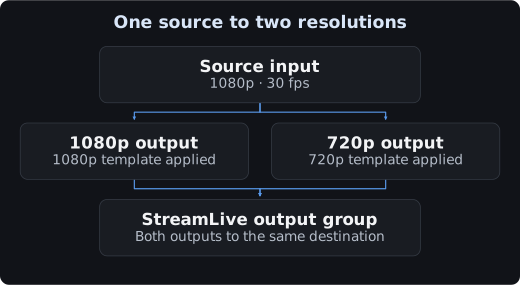
1080p and 720p outputs are each configured from the 1080p 30fps input. The player selects an output according to the provided quality list and the playback environment.
Components
| Component | Role |
|---|---|
| Security Group | Allows the push IPs that can connect to PUSH inputs |
| Input | Receives external video signals or pulls the origin |
| Channel | Execution unit that bundles inputs / processing settings / outputs |
| AV Template | Defines video / audio encoding parameters |
| Output | Template to use and individual output settings |
| Output Group | Output type and destination configuration |
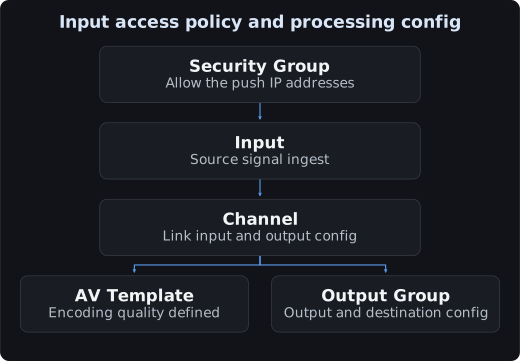
Security groups are used for the input access policy, and templates are used for the encoding settings of channel outputs.
Relationship between channels and outputs
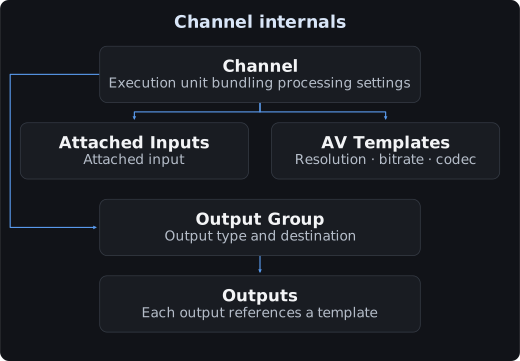
When creating 1080p and 720p, add two outputs and specify the shared video / audio template of the corresponding quality for each. If multiple audio tracks are needed, consider configuring separate audio / video templates.
Choosing the output type
| Output group type | Destination and purpose |
|---|---|
| HLS / DASH | Delivered to the specified destination with HTTP PUT |
| HLS_STREAM_PACKAGE / DASH_STREAM_PACKAGE | Delivered to a StreamPackage channel in the same account |
| HLS_ARCHIVE / DASH_ARCHIVE | Saves the live output to COS |
| M2TS | Sent to the destination with the SRT protocol |
| FRAME CAPTURE | Outputs frame images at regular intervals |
SRT is a transport protocol, and M2TS is the output group type of this configuration.
Basic configuration order
- Prepare the destination StreamPackage channel.
- Create a security group that allows the push IP and an input.
- Connect the input to the channel.
- Specify the StreamPackage destination in the output group.
- Set the per-resolution outputs and transcoding parameters.
- Start the channel and push the origin.
- Check the input / output status and the final video / audio playback.
Execution status and check criteria
IDLE is the standby state and RUNNING is the running state. Check the input metrics / output status / playback list / actual playback together.
Editing a running channel requires stopping it. Stopping a production channel affects the service, so keep it separate from test channels and schedule a maintenance window.
Next steps
- Input security group
- Input configuration
- Transcoding templates
- Channel configuration
- Full connection exercise