
StreamPackage Overview
StreamPackage is a packaging / origin service that takes an encoded live stream and serves playlists and segments for playback. If StreamLive is the stage that produces the resolutions and bitrates, StreamPackage is the stage that makes those results available for players and CDN to pull.
End-to-End Flow
For example, you send the 1080p and 720p outputs produced by StreamLive to StreamPackage. The player first reads the list of renditions from the HLS master playlist, then requests the media playlist and segments of the selected rendition in turn. Once CDN is attached, viewer requests are served through CDN.
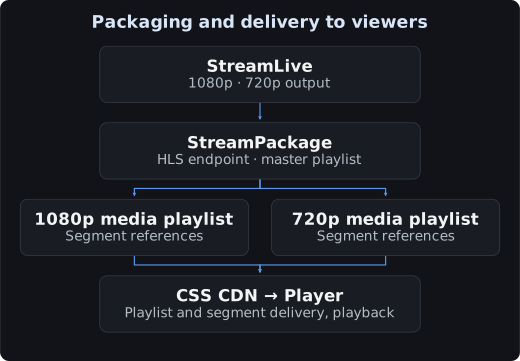
The per-rendition encoding must be prepared upstream.
The Four Console Components
| Component | Role | Values to check |
|---|---|---|
| Channel | The management unit that binds inputs and outputs together | Region, channel ID, input protocol |
| Input | The ingest point where the publishing system pushes the stream | The two auto-generated input addresses and the HTTP authentication status |
| Output Endpoint | The point where players and CDN pull the stream | Output type, playback list name, playback URL |
| CDN | The distribution path that reaches viewers | CSS integration permissions, playback domain, DNS, HTTPS |
Input addresses are for publishing, endpoint addresses are for playback, and the channel ID identifies the resource.
Navigating the Console by Feature
| Task | Screen to open | Result |
|---|---|---|
| Create an input channel | Channel management → Create Channel | A channel ID and two input addresses |
| Input authentication | Channel details → Input → Authentication | The HTTP authentication to apply on the publishing side |
| Create a playback address | Channel details → Output Endpoint → Create Output Endpoint | A HLS/DASH or supported CMAF output address |
| Play back a past point in time | Time-shifted Viewing in Output Endpoint | Playback from a specified point within the retention window |
| CSS distribution | Channel details → CDN | Cross-service permissions and playback domain binding |
| Save a past segment | Harvest Jobs | A job that stores a specified range in COS |
| Ad insertion | Server-Side Ad Insertion | A separate ad configuration linking ADS / source / sessions |
| Scheduled channel | Channel Linear Assembly | Building a linear channel from sources and program scheduling |
| Operational checks | Usage Statistics / Log Management | Reviewing usage and request / processing logs |
The basic integration is completed on three screens: the channel's Input, Output Endpoint, and CDN. Harvest, ad insertion, and scheduled channels are separate features. Review the screens and input values in the order Create a channel → Endpoints → CDN.
Basic Setup Order
- Create a channel: Select the region and the input protocol.
- Connect publishing: Specify the StreamPackage channel ID in the StreamLive output group, or configure the input address and required credentials in your external publishing system.
- Create an endpoint: Specify the output type and the playback list name.
- Verify input / output: Send a real signal and confirm that the playlist and segments are being updated.
- Attach CDN: Bind the cross-service permissions and the playback domain, then verify DNS / HTTPS / playback.
For a first-time setup, confirm basic playback with a HLS input and a HLS output first.
Input and Output Formats
| Item | Example supported configuration | Selection criteria |
|---|---|---|
| Channel input | HLS, DASH | The protocol your publishing system sends |
| Basic output | The HLS or DASH that corresponds to the input protocol | Target player compatibility |
| Additional outputs for a HLS input | CMAF-HLS, CMAF-DASH | Repackaging and target device support |
The console distinguishes between the CMAF-HLS and CMAF-DASH output types. CMAF repackaging of DRM inputs and similar cases have restrictions, so check Endpoint configuration.
Extensions Beyond Basic Playback
- Time shifting: Play back from a past point within the retention window.
- Harvest Job: Store a specified past segment in COS.
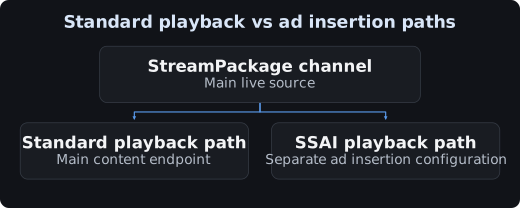
- SSAI: Integrate with an ad server to assemble ad paths into the playlist for each viewing session.
The following figure shows how the plain playback path and the ad insertion path differ in role.
Criteria for a Completed Setup
Verify source ingest, playlist updates, segment responses, and playback over the CDN domain separately. If you need redundancy, send the signal to both inputs and verify failover separately as well.