
SSAI Verification and Troubleshooting
Verifying is harder than turning it on.
Verification Preparation
These are the pipeline configuration items.
| Item | Method | Result |
|---|---|---|
| SSAI settings applied | DescribeStreamPackageChannel | SSAIEnable = True, same as the configured value |
| Endpoint playback | Request the master playlist | 200 |
| Rendition separation | Master playlist content | Two entries confirmed: 720p / 1080p |
| SCTE-35 passthrough | DescribeStreamLiveChannel | Behavior = PASSTHROUGH |
| Marker injection (Plan) | CreateStreamLivePlan | EXT-X-CUE-OUT occurs, EXT-X-CUE-IN after 60 seconds |
| PDT insertion | Media playlist | EXT-X-PROGRAM-DATE-TIME confirmed |
| Via CDN | Request by domain | 200 |
These are the actual measured values for the marker injected with Plan. The media playlist was polled at 5 seconds intervals.
| Elapsed | CUE-OUT | CUE-IN | Notes |
|---|---|---|---|
5 seconds | 0 | 0 | Not yet — |
10 seconds | 1 | 0 | Marker fired |
35 seconds | 7 | 0 | Entire playlist window is an ad break |
70 seconds | 6 | 1 | SpliceDuration elapsed, break ended |
90 seconds | 0 | 1 | Marker disappears from the window |
SpliceDuration was entered as 5400000 (60 seconds), and CUE-IN was recorded around 70 seconds. This means the tick conversion was applied correctly.
Verifying Ad Insertion
We hosted the ADS ourselves and checked the access logs, but there was not a single request coming in from StreamPackage.
The facts confirmed so far are as follows.
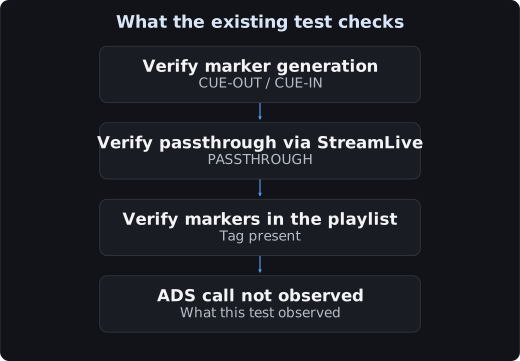
We tried several things while changing the settings.
| Attempt | Result |
|---|---|
| Google public VAST sample URL | No ADS call — |
Self-hosted VAST (work.) | No ADS call — |
AdTriggers [1] / [1,2,4,5] | Same |
Added Segmentation Descriptor TypeID=52 | Same |
TimeShiftEnable = True | Same |
| Created and applied a new endpoint | Same |
Before verifying ad insertion, check the account's SSAI usage settings in the console and cross-check the ADS request logs against actual playback.
If you need to verify ad insertion as well, first check the status of the SSAI usage request in the console.
Verification Procedure
1. Obtain the marker source      StreamLive Plan or an SCTE-35 encoder
2. Verify StreamLive passthrough  Behavior = PASSTHROUGH, CUE-OUT in the playlist
3. StreamPackage configuration    SSAIEnable = True
4. Verify the ADS response        Check whether requests appear in the ADS access log
5. Verify playback             Check whether ads play during the ad break
Check ad requests / responses in the ADS server logs. For an external ADS, use the provider's logs or diagnostic features.
1. StreamLive SCTE-35
tccli mdl DescribeStreamLiveChannel --region ap-seoul --Id 6AA6****5542 \
| python3 -c "
import sys,json
d=json.load(sys.stdin)['Info']
for g in d['OutputGroups']:
    for o in g['Outputs']:
        print(o['Name'], o['Scte35Settings'])
    print('PDT:', g['HlsRemuxSettings']['PdtInsertion'], g['HlsRemuxSettings']['PdtDuration'])
"
This is the expected result.
justinkimout1080p {'Behavior': 'PASSTHROUGH'}
justinkimout720p  {'Behavior': 'PASSTHROUGH'}
PDT: OPEN 600
2. StreamPackage SSAI
tccli mdp DescribeStreamPackageChannel --region ap-seoul --Id 6AA6****32BF \
| python3 -c "
import sys,json
for e in json.load(sys.stdin)['Info']['Points']['Endpoints']:
    print(e['Name'], 'SSAIEnable =', e.get('SSAIEnable'))
"
3. PDT Tag
curl -s "https://cdn." | head -8This is the expected result.
#EXTM3U
#EXT-X-VERSION:3
#EXT-X-MEDIA-SEQUENCE:40901677
#EXT-X-TARGETDURATION:4
#EXT-X-PROGRAM-DATE-TIME:2026-09-14T05:42:45.388Z
#EXTINF:4.000, seq 40901677
4. ADS Response
The VAST tag itself is checked as follows.
curl -s -o /dev/null -w "%{http_code}\n" "https://ads.example.com/vast?cid=****"
curl -s "https://ads.example.com/vast?cid=****" | head -3<?xml version="1.0" encoding="UTF-8"?><VAST version="3.0"><Ad id="..."># When hosting the ADS yourself
sudo grep 'vast.xml' /var/log/nginx/access.logCross-check the ADS request logs against the playlist marker timestamps to confirm the ad insertion segment.
When creating a VAST yourself, this is the minimum required.
<?xml version="1.0" encoding="UTF-8"?><VAST version="3.0"><Ad id="ad-001">
    <InLine>
      <AdSystem>test</AdSystem>
      <AdTitle>Test Ad</AdTitle>
      <Creatives>
        <Creative id="c1" sequence="1">
          <Linear>
            <Duration>00:01:00</Duration>
            <MediaFiles>
              <MediaFile delivery="progressive" type="video/mp4"
                         bitrate="500" width="1280" height="720">
                <![CDATA[https://example.com/ad.mp4]]>
              </MediaFile>
            </MediaFiles>
          </Linear>
        </Creative>
      </Creatives>
    </InLine></Ad></VAST>
Match Duration with the ad break (SpliceDuration), and it is best to keep the resolution of MP4 aligned with the main content.
Troubleshooting
| Symptom | Cause | Action |
|---|---|---|
| Marker not — in the stream | Not sent by the encoder | Inject with Plan and check only the marker segment first |
| Marker not — in the stream | SpliceDuration entered in seconds | Tick conversion (seconds × 90000) |
| Marker arrives but ad not — | The corresponding type is — in AdTriggers | Check the trigger value |
| Marker arrives but ad not — | DeliveryRestrictions mismatch | Try widening to 4 (Both) |
| Marker arrives but ADS log is empty | Account does not have SSAI activated (likely) | Check the SSAI usage request in the console |
| Ad replacement segment | ADS response | Check the ADS URL and response |
| Ad replacement segment | Slate | Check the accessibility of the SlateAd URL |
| Ad attached at the wrong point | PDT is off | PdtInsertion = OPEN |
| Stuttering during the ad break | Slate resolution mismatch | Unify the resolution and frame rate |
| Marker disappears | StreamLive does not pass it through | Behavior = PASSTHROUGH |
| Playback itself does not work | CDN domain issue | Refer to the CDN document |
Precautions
After the Modify call, use Describe to check the applied settings.
If you delete and recreate a StreamPackage channel, the hash in the endpoint URL changes. If you have hardcoded the playback URL in documents or apps, all of them will break. Be careful when deleting test channels.
Cleanup After Testing
# Stop the StreamLive channel
tccli mdl StopStreamLiveChannel --region ap-seoul --Id 6AA6****5542
# Stop the StreamLink Flow
tccli mdc StopStreamLinkFlow --region ap-seoul --FlowId 82iv****74eg
Billing continues while it is in the RUNNING state.