
Layer Decomposition
Automatically decompose one image into multiple independent layers with alpha channels — in effect, reversing a flat poster or composite image back into editable layered assets. Each layer returns four things:
- Layer image (PNG with alpha)
- Layer name
Name - Stacking order
ZIndex - Pixel coordinates
BoundingBox
Optionally, one additional PSD file can be produced, whose layers map one-to-one to the per-layer results.
Conventions used in this guide
All examples use URL input + RMS output (no COS bucket of your own required; results are returned as signed links). The capability actually supports all MPS image-processing input and output forms — switching to COS / AWS-S3 / VOD only requires replacing InputInfo and OutputStorage.
API Documentation
| Purpose | API | Official docs | API Explorer |
|---|---|---|---|
| Submit image processing | ProcessImage | ProcessImage | Debug online |
| Query task status | DescribeImageTaskDetail | DescribeImageTaskDetail | Debug online |
SDK Versions (Upgrade First)
AiDecomposeConfig is a newly added field that older SDKs do not contain. The table below lists the minimum version supporting it (all are the current latest releases):
| SDK | Package | Version requirement |
|---|---|---|
| Python | tencentcloud-sdk-python / tencentcloud-sdk-python-mps | >= 3.1.188 |
| Go | tencentcloud-sdk-go/tencentcloud/mps | >= v1.3.193 |
| Node.js | tencentcloud-sdk-nodejs-mps | >= 4.1.325 |
| PHP | tencentcloud/tencentcloud-sdk-php | >= 3.0.1681 |
| Java | com.tencentcloudapi:tencentcloud-sdk-java-mps | >= 3.2.40 |
Not upgrading shows up as "the field is silently dropped"
An older SDK's models has no AiDecomposeConfig member. Assigning it raises no error, but the field is not included when the request is serialized — the server receives an ordinary image-processing request with no decomposition config, so the task "succeeds" yet returns only a single image. Verify your SDK version before debugging parameters.
A complete runnable example (including task polling) is in Complete Example (Python) below.
Request Structure
URL input + RMS output + explicit layer count + extra PSD output:
{
  "Action": "ProcessImage",
  "InputInfo": {
    "Type": "URL",
    "UrlInputInfo": { "Url": "https://your-bucket-1250000000.cos.ap-guangzhou.myqcloud.com/input/poster.jpg" }
  },
  "OutputStorage": { "Type": "RMS" },
  "ImageTask": {
    "AiDecomposeConfig": {
      "Switch": "ON",
      "Model": "decompose-1.0-flash",
      "Layers": 5,
      "Prompt": ""
    }
  },
  "AddOnParameter": {
    "OutputConfig": { "Format": "PSD" }
  }
}
AiDecomposeConfig
| Parameter | Description | Values |
|---|---|---|
Switch | Capability switch | ON: enabled (default); OFF: disabled |
Model | Decomposition model | Only decompose-1.0-flash is currently supported (default, can be omitted); any other value returns InvalidParameter |
Layers | Target layer count | Optional integer, including the base layer, range [2, 17]; omitting it or passing 0 means the layer count is decided automatically. It is guidance on the upper bound, not a hard constraint — the actual count is whatever the response contains |
Prompt | Decomposition prompt | Optional. When non-empty it is used verbatim as the decomposition prompt and Layers is ignored. The server does not validate its length (an overly long prompt makes the task fail) |
Three Sources of the Prompt (Prompt Wins)
| Request shape | Behavior |
|---|---|
Prompt non-empty | Used verbatim: Prompt becomes the decomposition prompt; Layers is ignored even if provided |
Prompt empty, Layers set | Guided by count: decomposes toward the target count (the base layer takes 1 slot); the actual count may be lower |
Prompt empty, Layers empty | Automatic: the service decides how many layers to produce (up to 17) |
Recommended pattern for a custom Prompt (it is used verbatim, so the wording directly determines the result):
Decompose the image into separate editable layers and inpaint the occluded regions. <Named subjects, separated by ";">. Apart from the subjects named above, keep all remaining content in the base layer and do not split it out furtherA full example (the red car on the left, the burning cabin at the top right, and the title text at the top left each get their own layer; everything else stays in base):
"ImageTask": {
  "AiDecomposeConfig": {
    "Prompt": "Decompose the image into separate editable layers and inpaint the occluded regions. The red car running on the left of the frame; the burning wooden cabin at the top right; the white title text at the top left. Apart from the subjects named above, keep all remaining content in the base layer and do not split it out further"
  }
}
Why "keep all remaining content in the base layer" matters
Without that clause the model also splits out whatever else it considers salient, so the layer count becomes unpredictable and the cost rises with it (billing is per layer). Naming your subjects plus stating an explicit catch-all is the key to keeping the result within a predictable range.
Input: InputInfo
- The main input is required (the image to decompose) and supports
URL/COS/AWS-S3/VOD; this guide usesURL(an http/https direct link fetched by the server). - Input dimensions follow the general MPS image-processing limit (each side ≤ 10240).
Output Container: AddOnParameter.OutputConfig.Format
| Value | Output |
|---|---|
Omitted / PNG (default) | Per-layer PNGs only (with alpha) |
PSD | One additional PSD on top of the per-layer PNGs: canvas = the returned canvas size, and the PSD layers map one-to-one to the per-layer results (same name, same order, same position) |
Any other value (including JPEG / WEBP) returns InvalidParameter — layers must preserve alpha. Quality / AspectRatio / ImageSize / ImageWidth / ImageHeight have no effect on this capability.
Output Storage: RMS Mode
OutputStorage sits at the same level as ImageTask:
| Parameter | Description | Values |
|---|---|---|
Type | Output storage type | This guide uses RMS (MPS-managed storage): no bucket or region needed, the server allocates the output location, and results come back as signed links. COS / AWS-S3 / VOD are also supported (consistent with other image capabilities) |
OutputStorage is required with URL input
A URL cannot be used to derive an output location, so omitting it returns InvalidParameter. With COS / AWS-S3 / VOD input it may be omitted, in which case the input location is inherited.
Output Results
DescribeImageTaskDetail.ImageProcessTaskResultSet lists every layer in bottom-to-top order (ZIndex 0, 1, 2…), and with Format=PSD one PSD result is appended at the end. Each result's Output.Content is a JSON string:
Layer Result
{
  "Type": "Layer",
  "Name": "画面中央奔跑的男性人物",
  "ZIndex": 2,
  "BoundingBox": [612, 140, 1180, 920],
  "Canvas": { "Width": 1679, "Height": 937 }
}| Field | Description |
|---|---|
Type | Always Layer |
Name | Layer name, identical to the corresponding layer name in the PSD; layer_{ZIndex} when no name can be derived |
ZIndex | Stacking order, numbered consecutively from 0 (the base layer); higher means closer to the front |
BoundingBox | [X1, Y1, X2, Y2] in pixels, origin at the top-left of the canvas, always inside the canvas |
Canvas | Canvas size in pixels. The base layer's BoundingBox is always [0, 0, Width, Height] |
PSD Result (Format=PSD only)
{ "Type": "PSD", "Canvas": { "Width": 1679, "Height": 937 }, "LayerCount": 4 }A layer image's size does not necessarily equal its BoundingBox size
When compositing, scale each layer image to fill its BoundingBox, then stack the layers by ascending ZIndex onto a canvas of the Canvas size to restore the original image. Pasting at the raw pixel size misaligns the result.
Business Examples
Automatic Decomposition
{
  "Action": "ProcessImage",
  "InputInfo": {
    "Type": "URL",
    "UrlInputInfo": { "Url": "https://your-bucket-1250000000.cos.ap-guangzhou.myqcloud.com/input/poster.jpg" }
  },
  "OutputStorage": { "Type": "RMS" },
  "ImageTask": { "AiDecomposeConfig": { "Model": "decompose-1.0-flash" } }
}
Explicit Layer Count + PSD Output
{
  "Action": "ProcessImage",
  "InputInfo": {
    "Type": "URL",
    "UrlInputInfo": { "Url": "https://your-bucket-1250000000.cos.ap-guangzhou.myqcloud.com/input/poster.jpg" }
  },
  "OutputStorage": { "Type": "RMS" },
  "ImageTask": {
    "AiDecomposeConfig": { "Layers": 4 }
  },
  "AddOnParameter": { "OutputConfig": { "Format": "PSD" } }
}
Decomposition is guided toward 4 layers (base + 3), so expect at most 4 layers plus 1 PSD.
Using a Custom Prompt
"ImageTask": {
  "AiDecomposeConfig": {
    "Prompt": "Decompose the image into separate editable layers and inpaint the occluded regions. Put the red car running on the left of the frame on its own layer; put the burning wooden cabin at the top right on its own layer; put the white title text at the top left on its own layer. Apart from the subjects named above, keep all remaining content in the base layer and do not split it out further"
  }
}
Querying Results (DescribeImageTaskDetail)
Request:
{ "TaskId": "260000****-WorkflowTask-*************" }Response — In Progress
{
  "Response": {
    "TaskType": "WorkflowTask",
    "Status": "PROCESSING",
    "CreateTime": "2026-10-12T02:30:10Z",
    "RequestId": "d05d2499-cb25-41a2-b43a-d1e84e898f96"
  }
}
Response — Success (RMS output, 3 layers + PSD)
{
  "Response": {
    "TaskType": "WorkflowTask",
    "Status": "FINISH",
    "CreateTime": "2026-10-12T02:30:10Z",
    "FinishTime": "2026-10-12T02:30:42Z",
    "ImageProcessTaskResultSet": [
      {
        "Status": "SUCCESS",
        "Output": {
          "Path": "share/1250000000/20261012/3f2b1c9e-8a4d-4c7b-9f01-2d5e6a7b8c90.png",
          "SignedUrl": "https://beauty-1378942524.cos.ap-shanghai.myqcloud.com/share/1250000000/20261012/3f2b1c9e-….png?q-sign-algorithm=sha1&q-ak=…&q-signature=…",
          "Content": "{\"Type\":\"Layer\",\"Name\":\"base\",\"ZIndex\":0,\"BoundingBox\":[0,0,1679,937],\"Canvas\":{\"Width\":1679,\"Height\":937}}"
        }
      },
      {
        "Status": "SUCCESS",
        "Output": {
          "Path": "share/1250000000/20261012/a1b2c3d4-5e6f-4a7b-8c9d-0e1f2a3b4c5d.png",
          "SignedUrl": "https://beauty-1378942524.cos.ap-shanghai.myqcloud.com/share/1250000000/20261012/a1b2c3d4-….png?q-sign-algorithm=sha1&…",
          "Content": "{\"Type\":\"Layer\",\"Name\":\"画面中央奔跑的男性人物\",\"ZIndex\":1,\"BoundingBox\":[612,140,1180,920],\"Canvas\":{\"Width\":1679,\"Height\":937}}"
        }
      },
      {
        "Status": "SUCCESS",
        "Output": {
          "Path": "share/1250000000/20261012/b2c3d4e5-6f7a-4b8c-9d0e-1f2a3b4c5d6e.png",
          "SignedUrl": "https://beauty-1378942524.cos.ap-shanghai.myqcloud.com/share/1250000000/20261012/b2c3d4e5-….png?q-sign-algorithm=sha1&…",
          "Content": "{\"Type\":\"Layer\",\"Name\":\"右上角起火的木屋\",\"ZIndex\":2,\"BoundingBox\":[1180,120,1620,560],\"Canvas\":{\"Width\":1679,\"Height\":937}}"
        }
      },
      {
        "Status": "SUCCESS",
        "Output": {
          "Path": "share/1250000000/20261012/c3d4e5f6-7a8b-4c9d-0e1f-2a3b4c5d6e7f.psd",
          "SignedUrl": "https://beauty-1378942524.cos.ap-shanghai.myqcloud.com/share/1250000000/20261012/c3d4e5f6-….psd?q-sign-algorithm=sha1&…",
          "Content": "{\"Type\":\"PSD\",\"Canvas\":{\"Width\":1679,\"Height\":937},\"LayerCount\":3}"
        }
      }
    ],
    "RequestId": "bf13665d-843a-45f2-a297-97e9ef26966a"
  }
}
Response — Failure (terminal state)
{
  "Response": {
    "TaskType": "WorkflowTask",
    "Status": "FINISH",
    "ErrMsg": "ContentBlocked",
    "CreateTime": "2026-10-12T02:30:10Z",
    "FinishTime": "2026-10-12T02:30:18Z",
    "RequestId": "bf13665d-843a-45f2-a297-97e9ef26966a"
  }
}
Two things that are easy to get wrong
① Do not map layers by file name. The result order is the layer order (bottom-to-top, ascending ZIndex), and the PSD is always last; map layers using ZIndex / Name from Content. (With COS output the default file names are {inputFileName}_layer_{ZIndex}.png / {inputFileName}.psd; with RMS output they are server-side UUID names.)
② Failure is also a terminal state. Status=FINISH with no result set, and the reason is in Response.ErrMsg — do not treat "no ImageProcessTaskResultSet" as still-processing and keep polling. Parameter validation failures at submit time never reach task querying; they return the InvalidParameter error synchronously.
Complete Example (Python)
Requires tencentcloud-sdk-python >= 3.1.188. The script does three things: submit ProcessImage (URL input + RMS output) → poll DescribeImageTaskDetail until terminal → print each layer's result (optionally downloading the signed links).
#!/usr/bin/env python3
# -*- coding: utf-8 -*-
"""Layer decomposition (AiDecomposeConfig) example: URL input + RMS output, submitting ProcessImage via SDK models and polling to a terminal state."""

import argparse
import json
import sys
import time
import urllib.request

from tencentcloud.common import credential
from tencentcloud.common.exception.tencent_cloud_sdk_exception import TencentCloudSDKException
from tencentcloud.common.profile.client_profile import ClientProfile
from tencentcloud.common.profile.http_profile import HttpProfile
from tencentcloud.mps.v20190612 import models, mps_client

ENDPOINT = "mps.tencentcloudapi.com"


def parse_args():
    parser = argparse.ArgumentParser(description="MPS image layer decomposition example")
    parser.add_argument("--secret-id", required=True, help="Tencent Cloud API SecretId")
    parser.add_argument("--secret-key", required=True, help="Tencent Cloud API SecretKey")
    parser.add_argument("--image-url", required=True, help="Publicly reachable URL of the image to decompose")
    parser.add_argument("--layers", type=int, default=0, help="Target layer count [2,17] (incl. base); 0 = automatic")
    parser.add_argument("--prompt", default="", help="Custom decomposition prompt; used verbatim and overrides --layers when non-empty")
    parser.add_argument("--psd", action="store_true", help="Also output one PSD file")
    parser.add_argument("--region", default="ap-guangzhou", help="API region")
    parser.add_argument("--timeout", type=int, default=600, help="Maximum polling wait in seconds")
    parser.add_argument("--interval", type=float, default=3, help="Polling interval in seconds")
    parser.add_argument("--download-dir", default=None, help="Optional: download results into this directory")
    return parser.parse_args()


def build_request(args):
    decompose = models.AiDecomposeConfig()
    if args.layers:
        decompose.Layers = args.layers
    if args.prompt:
        decompose.Prompt = args.prompt

    image_task = models.ImageTaskInput()
    image_task.AiDecomposeConfig = decompose

    url_input = models.UrlInputInfo()
    url_input.Url = args.image_url
    input_info = models.MediaInputInfo()
    input_info.Type = "URL"
    input_info.UrlInputInfo = url_input

    # RMS (MPS-managed storage): only Type is needed, no bucket/region; results come back as signed links
    output_storage = models.TaskOutputStorage()
    output_storage.Type = "RMS"

    req = models.ProcessImageRequest()
    req.InputInfo = input_info
    req.OutputStorage = output_storage
    req.ImageTask = image_task

    if args.psd:
        output_config = models.ImageProcessOutputConfig()
        output_config.Format = "PSD"
        add_on = models.AddOnParameter()
        add_on.OutputConfig = output_config
        req.AddOnParameter = add_on
    return req


def fetch_results(detail, download_dir):
    for i, item in enumerate(detail.ImageProcessTaskResultSet or []):
        output = item.Output
        if output is None:
            continue
        content = {}
        if output.Content:
            try:
                content = json.loads(output.Content)
            except ValueError:
                content = {"raw": output.Content}
        if content.get("Type") == "Layer":
            print("  [{}] Layer ZIndex={} Name={} BoundingBox={} Canvas={}x{}".format(
                i, content.get("ZIndex"), content.get("Name"), content.get("BoundingBox"),
                (content.get("Canvas") or {}).get("Width"), (content.get("Canvas") or {}).get("Height")))
        else:
            print("  [{}] {} {}".format(i, content.get("Type"), json.dumps(content, ensure_ascii=False)))
        print("        Path={}".format(output.Path))
        if output.SignedUrl:
            print("        SignedUrl={}".format(output.SignedUrl[:120] + "..."))
            if download_dir:
                name = "{}_{}".format(i, content.get("ZIndex", content.get("Type", "out")))
                ext = ".psd" if content.get("Type") == "PSD" else ".png"
                dst = "{}/{}{}".format(download_dir.rstrip("/"), name, ext)
                urllib.request.urlretrieve(output.SignedUrl, dst)
                print("        saved -> {}".format(dst))


def main():
    args = parse_args()

    http_profile = HttpProfile()
    http_profile.endpoint = ENDPOINT
    profile = ClientProfile()
    profile.httpProfile = http_profile
    client = mps_client.MpsClient(credential.Credential(args.secret_id, args.secret_key),
                                  args.region, profile)

    try:
        resp = client.ProcessImage(build_request(args))
    except TencentCloudSDKException as e:
        raise SystemExit("[ProcessImage] call failed: {}".format(e))
    print("TaskId:", resp.TaskId)

    start = time.time()
    last_status = None
    while True:
        detail_req = models.DescribeImageTaskDetailRequest()
        detail_req.TaskId = resp.TaskId
        try:
            detail = client.DescribeImageTaskDetail(detail_req)
        except TencentCloudSDKException as e:
            raise SystemExit("[DescribeImageTaskDetail] call failed: {}".format(e))
        if detail.Status != last_status:
            print("status: {} ({:.1f}s)".format(detail.Status, time.time() - start))
            last_status = detail.Status
        if detail.Status == "FINISH":
            break
        if time.time() - start > args.timeout:
            raise SystemExit("Polling timed out ({}s), last status: {}".format(args.timeout, detail.Status))
        time.sleep(args.interval)

    print("Terminal state: Status={}, elapsed {:.1f}s".format(detail.Status, time.time() - start))
    if detail.ErrMsg:
        print("Task failed: {} {}".format(detail.ErrMsg, detail.Message or ""))
        sys.exit(1)
    fetch_results(detail, args.download_dir)


if __name__ == "__main__":
    main()
Run it:
pip install -U "tencentcloud-sdk-python>=3.1.188"
python3 call_decompose.py --secret-id <SecretId> --secret-key <SecretKey> \
    --image-url https://your-bucket-1250000000.cos.ap-guangzhou.myqcloud.com/input/poster.jpg \
    --layers 4 --psd --download-dir ./out
Sample output:
TaskId: 260000******-WorkflowTask-******************
status: WAITING (0.3s)
status: PROCESSING (2.1s)
status: FINISH (38.6s)
Terminal state: Status=FINISH, elapsed 38.6s
  [0] Layer ZIndex=0 Name=base BoundingBox=[0, 0, 1679, 937] Canvas=1679x937
        Path=share/1250000000/20261012/3f2b1c9e-8a4d-4c7b-9f01-2d5e6a7b8c90.png
        SignedUrl=https://beauty-1378942524.cos.ap-shanghai.myqcloud.com/share/1250000000/20261012/3f2b1c9e-...
        saved -> ./out/0_0.png
  [1] Layer ZIndex=1 Name=画面中央奔跑的男性人物 BoundingBox=[612, 140, 1180, 920] Canvas=1679x937
        Path=share/1250000000/20261012/a1b2c3d4-5e6f-4a7b-8c9d-0e1f2a3b4c5d.png
        SignedUrl=https://beauty-1378942524.cos.ap-shanghai.myqcloud.com/share/1250000000/20261012/a1b2c3d4-...
        saved -> ./out/1_1.png
  [2] Layer ZIndex=2 Name=右上角起火的木屋 BoundingBox=[1180, 120, 1620, 560] Canvas=1679x937
        Path=share/1250000000/20261012/b2c3d4e5-6f7a-4b8c-9d0e-1f2a3b4c5d6e.png
        SignedUrl=https://beauty-1378942524.cos.ap-shanghai.myqcloud.com/share/1250000000/20261012/b2c3d4e5-...
        saved -> ./out/2_2.png
  [3] PSD {"Type": "PSD", "Canvas": {"Width": 1679, "Height": 937}, "LayerCount": 3}
        Path=share/1250000000/20261012/c3d4e5f6-7a8b-4c9d-0e1f-2a3b4c5d6e7f.psd
        SignedUrl=https://beauty-1378942524.cos.ap-shanghai.myqcloud.com/share/1250000000/20261012/c3d4e5f6-...
        saved -> ./out/3_PSD.psd
Input / Output Example
Input: a 1024×1024 product shot of a silver suitcase (direct URL, e.g. https://your-bucket-1250000000.cos.ap-guangzhou.myqcloud.com/input/suitcase.png).
Output (request with Switch=ON and Format=PSD; automatic decomposition returned 2 layers + 1 PSD in this case):
| # | Type | File | Content summary |
|---|---|---|---|
| 0 | Layer (base, full canvas) |  | ZIndex=0, BoundingBox=[0,0,1024,1024] |
| 1 | Layer | 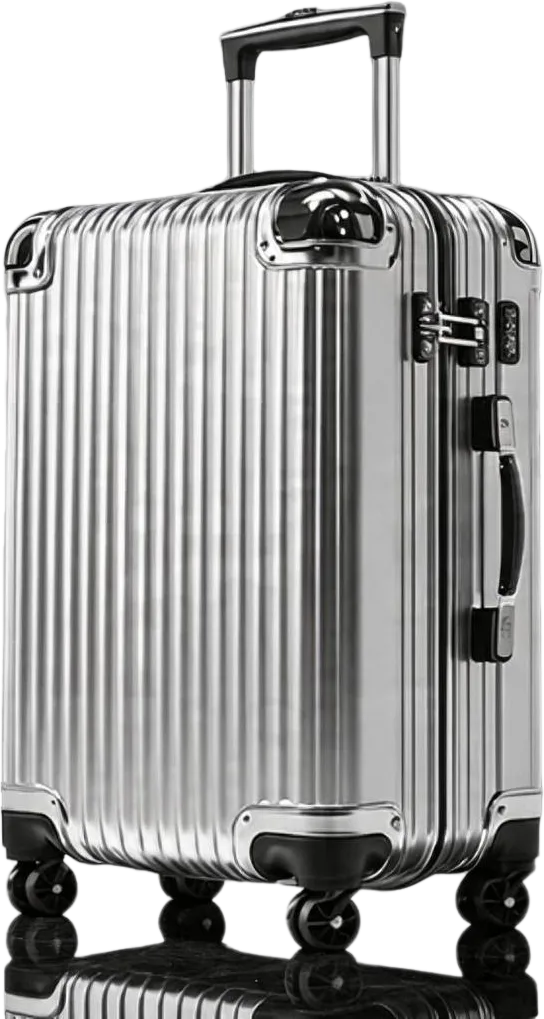 | ZIndex=1, Name=银色竖条纹硬壳行李箱整体, BoundingBox=[258,65,771,1024] |
| 2 | PSD | 2_PSD.psd | LayerCount=2 (including base), canvas 1024×1024 |
Note the base layer: the background occluded by the suitcase in the original has been inpainted (this is what "inpaint the occluded regions" produces), so it is a usable standalone empty scene rather than an image with a hole in it.
How to recompose: scale each layer PNG to fill its own BoundingBox, then stack them by ascending ZIndex onto a 1024×1024 canvas to get the original image back. Opening the PSD in Photoshop shows the same layers in the same order.
Billing (Test Phase)
Temporary billing item
The billing item is Advanced Image Edit AdvancedImageEdit (part of the MPS image-processing billing family). Billing will be revised later; this item is temporary.
- Counting rule: each returned layer image counts as one unit, billed at that layer image's actual resolution (different layers may have different resolutions).
- PSD files are not billed (the extra file produced with
Format=PSDincurs no charge). - There are no additional billing items beyond per-layer charges, and failed tasks (terminal failure) are not billed.
- Resolution tiers are determined by the shorter side (consistent with general MPS image-processing conventions):
| Tier | Shorter-side range | Advanced Image Edit list price (CNY per image) |
|---|---|---|
| 720P | ≤ 720px | 0.1 |
| 1080P | 720px < shorter side ≤ 1080px | 0.2 |
| 2K | 1080px < shorter side ≤ 1440px | 0.4 |
| 4K | 1440px < shorter side ≤ 2160px | 0.8 |
| 8K | 2160px < shorter side ≤ 4320px | 1.6 |
Billing example: a 1679×937 input decomposed into base + 2 subjects (3 layers total) + 1 PSD, where all three layers have a shorter side between 720px and 1080px (the 1080P tier):
3 layers × CNY 0.2 (1080P tier) = CNY 0.6; the PSD file is not billedThe layer count is whatever the response actually contains. Usage and bills appear under the MPS Image Processing billing item in the console.
Layer count drives cost directly
Because billing is per layer, how you write Layers and Prompt affects not only the result but also the bill. When cost needs to be predictable, naming subjects in a custom Prompt plus an explicit "keep the rest in base" clause beats unconstrained automatic decomposition.
Limits
| Item | Limit |
|---|---|
Main InputInfo | Required (the image to decompose); supports URL / COS / AWS-S3 / VOD; OutputStorage is required with URL input |
| Combining with other capabilities | Not supported: ImageTask may carry only AiDecomposeConfig, not ScheduleId; with Switch=OFF the request is handled as an ordinary one |
| Input dimensions | Same as the general MPS image-processing limit (each side ≤ 10240) |
Layers | Integer, [2, 17] (including base); omitted / 0 = automatic |
Prompt | Length is not validated; an overly long prompt makes the task fail |
| Output format | PNG (default) or PSD |
| Output layer count | Decided by the service from the image content, up to 17 layers (including base); Layers is guidance only |
| Output file names | COS / VOD output: layers {inputFileName}_layer_{ZIndex}.png, PSD {inputFileName}.psd; RMS output uses server-side UUID names, so map layers via Content |
Common Error Codes
| Error code | Meaning | Typical cause |
|---|---|---|
InvalidParameter | Invalid parameter | Unsupported Model / Switch value; Layers outside [2, 17] (and not 0); OutputConfig.Format is not PNG / PSD; missing main InputInfo; OutputStorage omitted with URL input; combined with another capability |
InvalidInput | Failed to fetch the input | The input image URL is unreachable / the COS object does not exist |
InputSizeExceeded | Input dimensions exceed the limit | A side exceeds 10240 |
UnsupportedMediaType | Input cannot be decoded | Corrupted or non-image file |
ContentBlocked | Content moderation rejected | The input or output failed moderation |
TooManyRequests | Too many requests | Too many submissions in a short window; lower the rate and retry |
InternalError | Internal service error | The image cannot be decomposed (including an overly long Prompt); the task ends immediately and is not retried automatically |
ServiceUnavailable | Service temporarily unavailable | Resubmit later |
Related Documents
| Document | Description |
|---|---|
| API Reference | General MPS authentication, TC3 signing, and request execution conventions |
| SDK Reference | The full flow for calling key MPS APIs with the official SDKs |