
SCTE-35 Markers and Triggers
These settings determine which signals are treated as ad breaks. SSAI will only actually react if this part is configured correctly.
Request Example
When the encoder sends a splice_insert SCTE-35 marker, specify 1 in AdTriggers of StreamPackage so that it is recognized as an ad break.
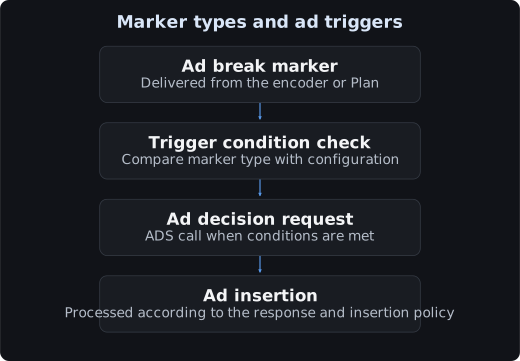
Conversely, if it were AdTriggers = [2, 4], it is ignored because there is no 1.
AdTriggers Values
| Value | Marker Type | Description |
|---|---|---|
1 | Splice Insert | The most common ad insertion signal |
2 | Provider Advertisement | Provider advertisement |
3 | Distributor Advertisement | Distributor advertisement |
4 | Provider Placement Opportunity | Provider placement opportunity point |
5 | Distributor Placement Opportunity | Distributor placement opportunity point |
6 | Break | Break |
7 | Provider Overlay Placement Opportunity | Provider overlay point |
8 | Distributor Overlay Placement Opportunity | Distributor overlay point |
For the first validation, start with AdTriggers=[1] and add the values needed to match the actual marker type.
SCTE35AdType
| Value | Behavior |
|---|---|
1 | Handles all SCTE-35 types (default) |
2 | SCTE-35 enhanced. Only parses some types |
Choose according to the marker format the encoder sends. 1 is sufficient in most cases.
DeliveryRestrictions
SCTE-35 markers also carry distribution restriction information. This value determines whether to insert ads based on the restriction conditions.
| Value | Condition |
|---|---|
1 | None (ignores restriction information) |
2 | Only when Restricted (default) |
3 | Only when Unrestricted |
4 | Both |
If the encoder fills in and sends restriction information but you have left it as 2, markers that do not match the condition are ignored.
Threshold and Slate Ad
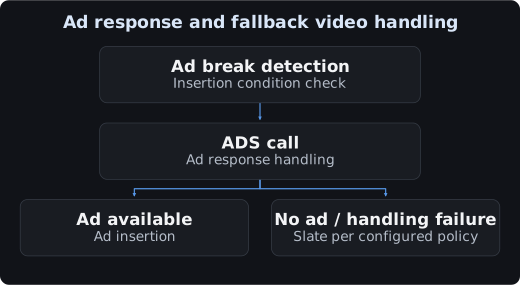
A slate is a substitute video that fills the interval spent waiting for an ad response.
| Field | Recommended | Reason |
|---|---|---|
Threshold | Slightly smaller than the break length | If too large, a blank screen lasts too long |
SlateAd | Same resolution / frame rate as the main content | If the resolution differs, there is a jump at the transition |
Prepare a slate video that is short and simple so that it holds up under repeated playback.
AdMarkerPassthrough
| Value | Behavior |
|---|---|
false | Consumes the marker and inserts ads (default) |
true | Passes the marker through as is |
true is the marker passthrough mode. It is used when a downstream system handles the ads.
Where to Insert Markers
There are two methods.
| Method | What Is Needed | When to Use |
|---|---|---|
| Insert in the encoder | SCTE-35-capable encoder | Production environment |
| StreamLive Plan | A single API call | Testing, demos, validating the marker itself |
Inject a test marker with a Plan and check the StreamLive passthrough and the position recognized by StreamPackage.
tccli mdl CreateStreamLivePlan --region ap-seoul \
  --ChannelId 6941****5240 \
  --Plan '{"EventName":"ad_break_001",
           "TimingSettings":{"StartType":"IMMEDIATE"},
           "EventSettings":{"EventType":"SCTE35_SPLICE_INSERT",
                            "SpliceEventID":909001,
                            "SpliceDuration":"5400000"}}'
For details, see Injecting SCTE-35 with a Plan.
Settings on the StreamLive Side Are Also Required
For StreamPackage to see the markers, StreamLive must pass the markers through.
| Location | Setting |
|---|---|
| StreamLive Output | Scte35Settings.Behavior = PASSTHROUGH |
| StreamLive OutputGroup | HlsRemuxSettings.PdtInsertion = OPEN |
For details, see SCTE-35 and PDT.
Settings Used in This Guide
| Item | Value |
|---|---|
AdTriggers | [1, 2, 4, 5] |
SCTE35AdType | 1 |
DeliveryRestrictions | 4 |
AdMarkerPassthrough | false |
Threshold | 12 |
SlateAd | Public sample MP4 |