
Vega Image HOT
Endpoint: POST https://mps.intl.tencentcloudapi.comAction: CreateAigcImageTask
Vega Image is WAND's in-house image generation model, supporting text-to-image and reference-image editing. It comes in Pro / Flash / Lite, and results are queried with DescribeAigcImageTask.
Basic Information
| Item | Value |
|---|---|
| ModelName | wand-vega-image |
| ModelVersion | 1.0-pro / 1.0-flash / 1.0-lite |
| Input | Text / Reference image URL |
| Result query | DescribeAigcImageTask |
| Result storage | COS bucket specified in StoreCosParam |
| Guardrail release support | Supported |
Supported Specifications by Version
| Version | Resolution | Aspect Ratio | Reference Image |
|---|---|---|---|
1.0-pro | 1920×1080 | 16:9 | 2 configuration |
1.0-flash | 1920×1080 | 16:9 | 2 configuration |
1.0-lite | 1920×1080 | 16:9 | 2 configuration |
The output sizes in the table are configurations that specify 1920x1080 in size of AdditionalParameters. Reference images are passed via ImageUrl of each item.
Reference Image Specifications
| Version | Number of Example Reference Images | Recommended Size per File | Format |
|---|---|---|---|
1.0-pro | 2 configuration | 10MB or less | PNG / JPEG |
1.0-flash | 2 configuration | 10MB or less | PNG / JPEG |
1.0-lite | 2 configuration | 10MB or less | PNG / JPEG |
Reference images are passed in ImageInfos.ImageUrl. The 2 images in the table is the input configuration used in the integration example and does not mean the maximum number of images the model supports. The reference URL must be downloadable by the generation service; for private objects, use a valid signed URL.
Generation Example
A snowfield background and a character sheet are input together to generate a single scene. The first image references the location and lighting, and the second image references the person's face and outfit.
Reference Images
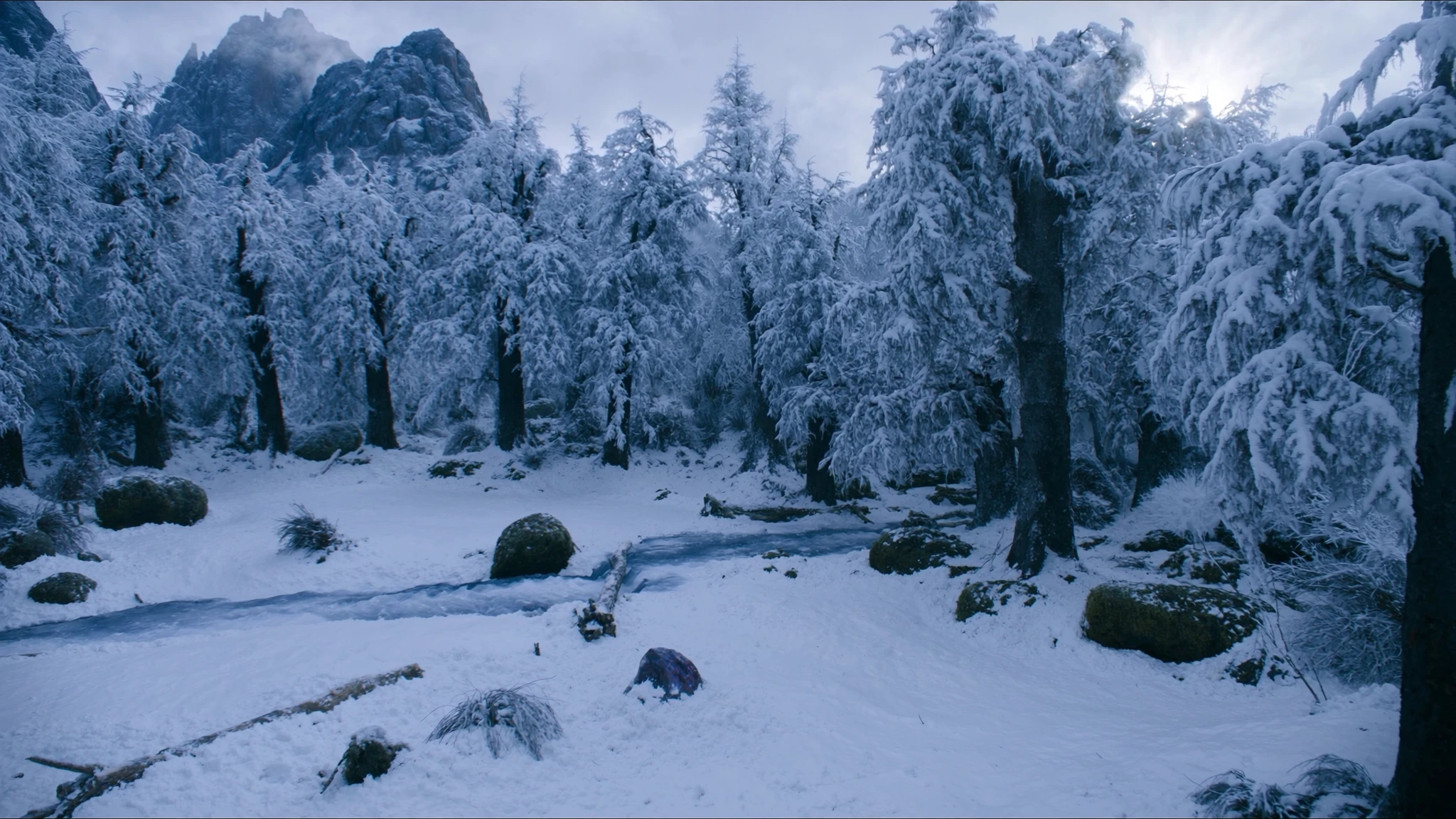
Image 1 / Snowfield background
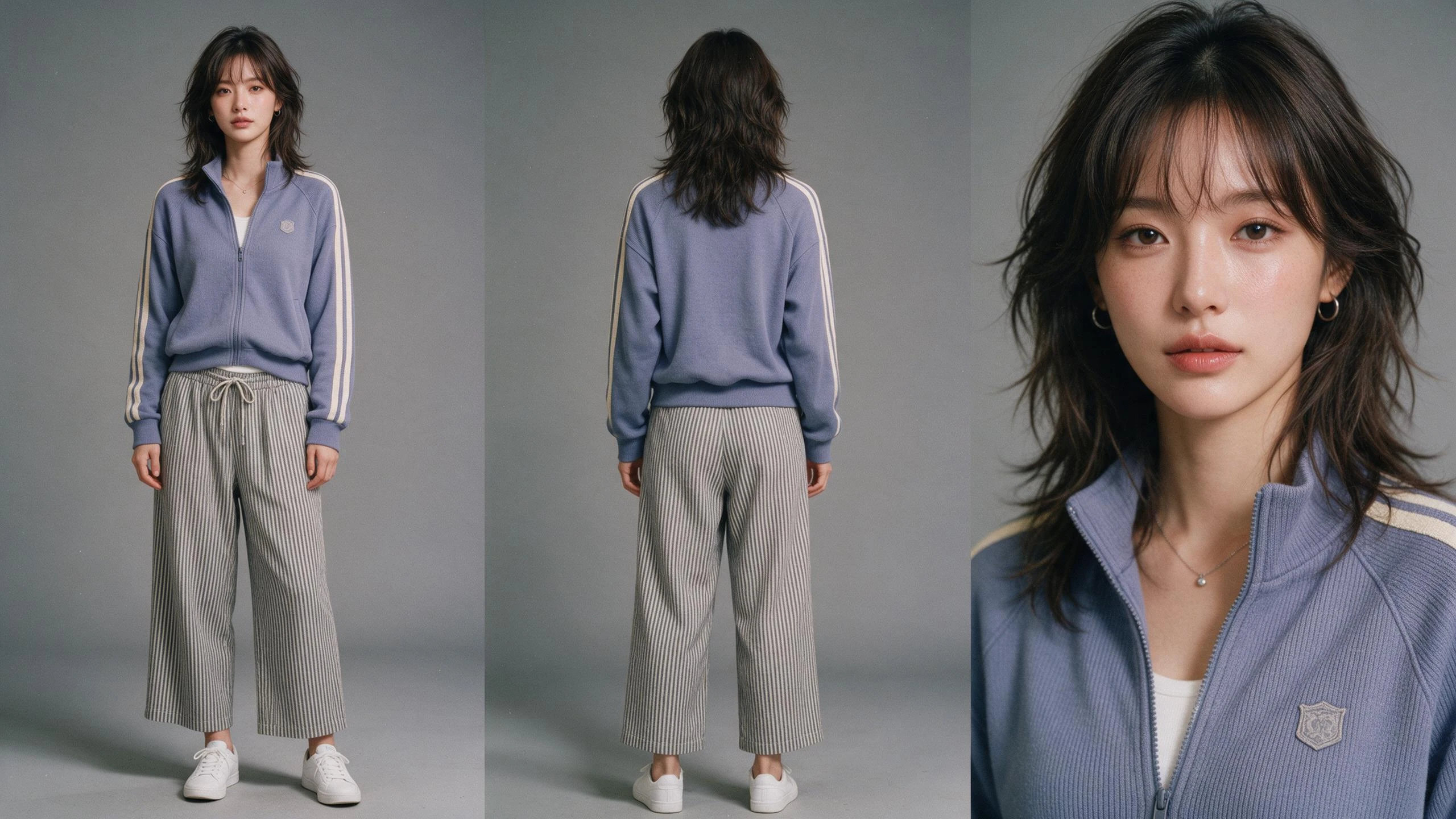
Image 2 / Character's face and outfit
Pro / Lite Generation Results
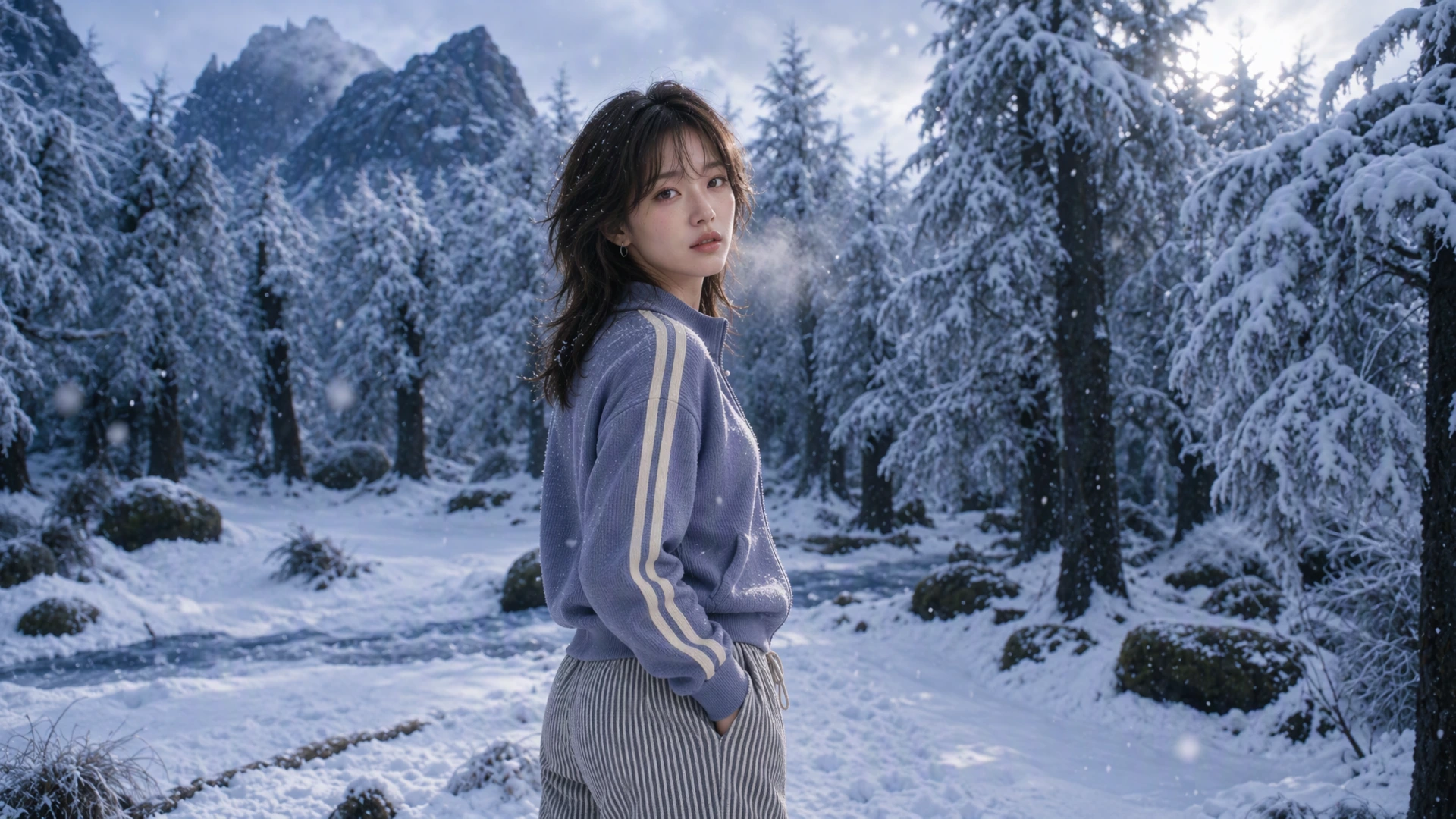
Pro / Character in the snowfield
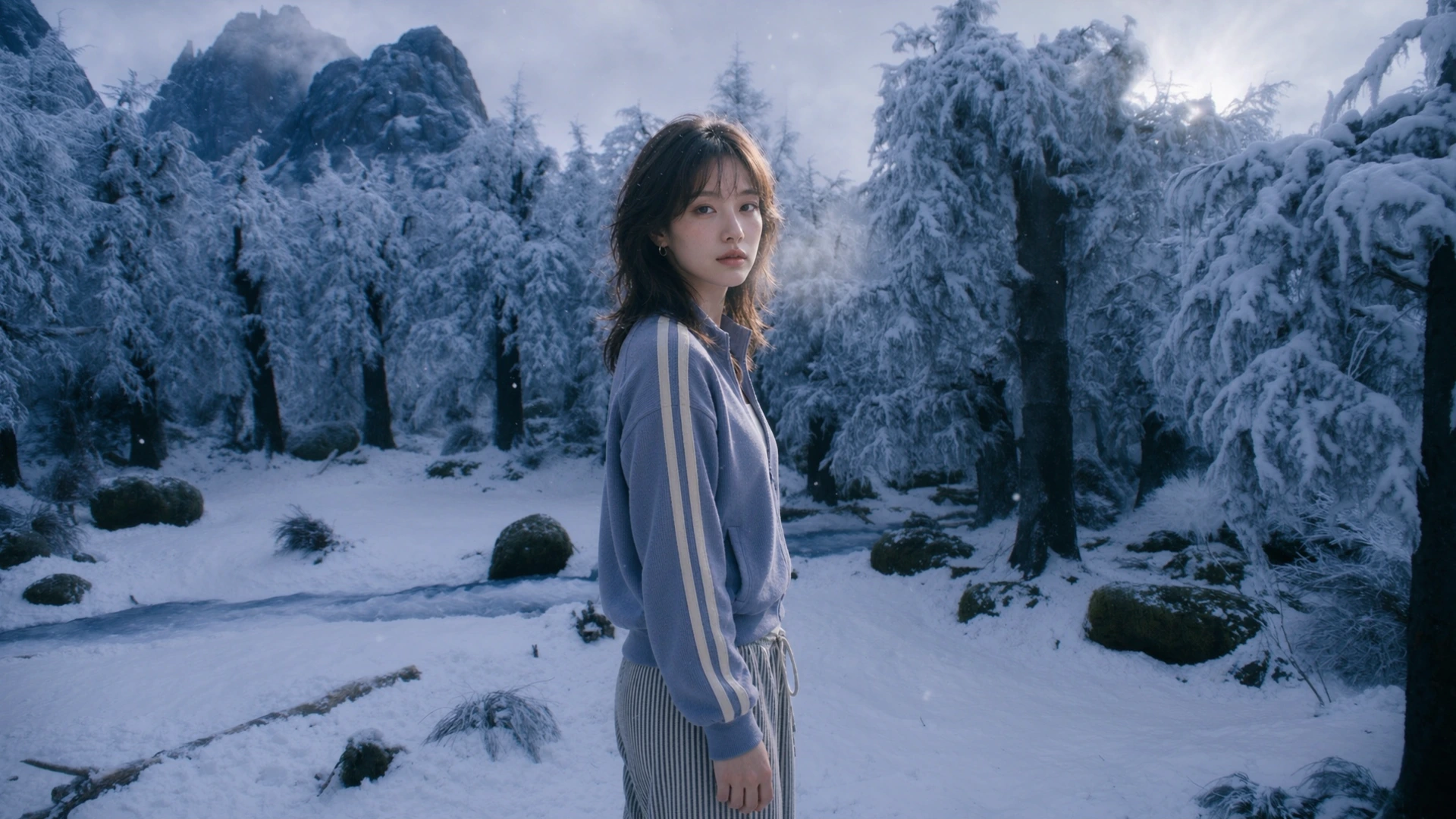
Lite / Character in the snowfield
The same reference images and prompt were used for both versions. The output size is 1920×1080. Specify the roles of the reference images separately, and request a scene featuring one person instead of multiple views of a character sheet.
Request Parameters
| Parameter | Required | Type | Description |
|---|---|---|---|
ModelName | Required | String | wand-vega-image |
ModelVersion | Required | String | 1.0-pro / 1.0-flash / 1.0-lite |
Prompt | Required | String | Instruction for the image to generate or for editing the reference image |
EnhancePrompt | Optional | Boolean | Automatic prompt correction. The example uses false |
ImageInfos.N | Optional | Array | List of reference images |
ImageInfos.N.ImageUrl | Conditionally required | String | HTTPS URL of the reference image |
AdditionalParameters | Optional | String | JSON string containing model-specific options. Specify the output size with size |
StoreCosParam | Optional | Object | COS bucket and path where the result is stored |
StoreCosParam.CosBucketName | Conditionally required | String | Name of the bucket where the result is stored |
StoreCosParam.CosBucketRegion | Conditionally required | String | Bucket region. Example: ap-singapore |
StoreCosParam.CosBucketPath | Optional | String | Path prefix of the result object |
Request Example
Text-Based Generation
{
  "ModelName": "wand-vega-image",
  "ModelVersion": "1.0-pro",
  "Prompt": "A golden retriever astronaut floating inside a spacecraft cupola window, wearing a white spacesuit and dark sunglasses, Earth visible behind the glass, cinematic lighting.",
  "EnhancePrompt": false,
  "AdditionalParameters": "{\"size\":\"1920x1080\"}",
  "StoreCosParam": {
    "CosBucketName": "example-1250000000",
    "CosBucketRegion": "ap-singapore",
    "CosBucketPath": "/vega/"
  }
}
Composing a Scene with Reference Images
The request below is the prompt and reference configuration used for the Pro result above. Lite specifies ModelVersion as 1.0-lite.
{
  "ModelName": "wand-vega-image",
  "ModelVersion": "1.0-pro",
  "Prompt": "Use reference image 1 as the snowy forest location and reference image 2 only as the identity and outfit reference for one adult woman. Create ONE cinematic photograph, not a character sheet or collage. The same woman stands on the snowy path, framed from mid-thigh up, slightly left of center, looking back toward camera with a quiet thoughtful expression. Preserve her face, short layered dark hair, lavender zip-up track jacket with cream sleeve stripes, white inner shirt, striped gray trousers, small hoop earrings and delicate necklace. Preserve the forest's snow-laden conifers, rocky mountains and blue winter light. Add natural cold breath and a few drifting snowflakes. Realistic skin texture, believable feet/body placement and contact shadows, coherent lighting and perspective, soft backlight, subtle cinematic depth of field, premium film still, no text, no logos, no duplicated people.",
  "EnhancePrompt": false,
  "ImageInfos": [
    {
      "ImageUrl": ""
    },
    {
      "ImageUrl": ""
    }
  ],
  "AdditionalParameters": "{\"size\": \"1920x1080\"}",
  "StoreCosParam": {
    "CosBucketName": "example-1250000000",
    "CosBucketRegion": "ap-singapore",
    "CosBucketPath": "/vega/"
  }
}
Response and Result Query
A generation request returns TaskId. Pass the same TaskId to DescribeAigcImageTask.
{
  "Response": {
    "TaskId": "2600012260-AigcImage-10c86f2c4eef4851814f073682902258",
    "RequestId": "f81c4bfa-2311-4882-b172-2ebebbd5d8c3"
  }
}{
"TaskId": "2600012260-AigcImage-10c86f2c4eef4851814f073682902258"
}Status=DONE, and once an address is returned in ImageUrls, the result is available for use.
{
  "Response": {
    "Status": "DONE",
    "Message": "ok",
    "ImageUrls": [
      "https://example-1250000000.cos.ap-singapore.myqcloud.com/vega/result.png"
    ],
    "RequestId": "f81c4bfa-2311-4882-b172-2ebebbd5d8c3"
  }
}
Special Configuration
Output Size
AdditionalParameters is the value obtained by serializing the JSON object into a string. In size, specify the pixel size in widthxheight format.
{
  "AdditionalParameters": "{\"size\":\"1920x1080\"}"
}
Specifying the Role of Reference Images
Describe the role of each image in the prompt according to the order of ImageInfos. Specify that the background image references the location and lighting, and the character image references the face / hairstyle / outfit. Use the character sheet to configure the person, and specify the number of people and the composition of the result separately.
Output files are returned as PNG in Pro / Lite and JPEG in Flash. When saving, use the returned file format and extension.
Result Storage
If StoreCosParam is specified, the generation result is stored in the corresponding COS bucket. Download results in a private bucket using a COS SDK or a signed URL. For authentication, request execution, and common storage specifications, refer to API Reference.