
StreamLink redundancy and failover
Redundancy is a configuration for continuing the service on another path when a failure occurs on one path. You must verify not only the creation of backup resources, but also backup signal transmission, failure detection, path selection, and playback recovery.
Distinguishing the two configurations
| Configuration | What it protects | Switchover handling |
|---|---|---|
| Input failover of a single flow | Primary / backup signals of supported inputs | StreamLink switches to the backup signal when an input fails |
| Separate main / backup flows | Independently configured transmission paths | Path selection logic of the receiving system, etc. is configured separately |
Configuring input failover
According to the official documentation, SRT Listener, RTMP_PUSH, and RTP inputs support failover.
- Enable failover on the input creation or settings screen.
- If needed, select an additional input availability zone.
- Check the two generated input addresses.
- Send the signal to both addresses from the push side.
- In the console, verify that both paths are ready and run a test that stops the primary input.
StreamLink uses the stream that arrives first as the primary input and switches to the backup stream when the primary input fails. Check based on the two addresses created in the console and the connection status of each.
The perceived interruption varies depending on the failure determination, origin timestamps, GOP, and receive buffer.
Configuring main / backup flows
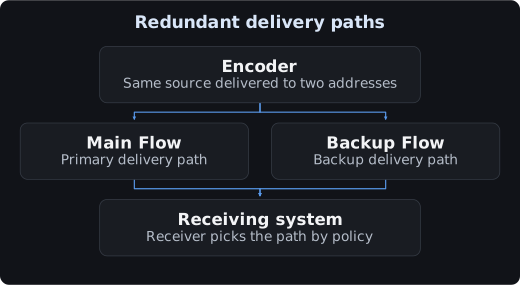
Configure inputs and outputs on two independent flows. The push side sends the signal to both, and on the receiving side you set the output selection / switchover policy.
Region-level redundancy also designs in the independence of the push equipment / lines / power / receive paths. Cost is calculated from the running time / bandwidth / traffic of each input / output node.
Differences from multiple outputs
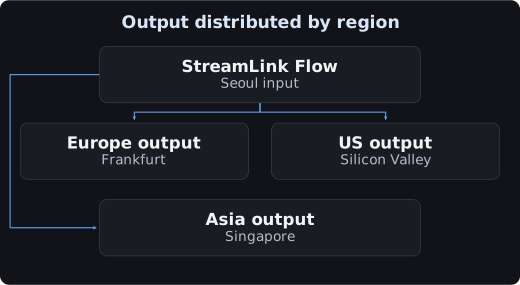
Distributing the same input to multiple outputs expands the distribution targets. Check the concurrent pull limit and output type of Pinpoint and configure them to match the number of receiving platforms.
Verifying failover
| Test | What to check |
|---|---|
| Normal state | Both primary / backup paths receive the actual signal |
| Primary push stopped | Failure detection time, switchover-to-backup time, playback recovery time |
| Primary path recovery | Selected path and re-switchover behavior after recovery |
| Failure on the receiving side | Handling of failures in the receiving system or output path |
| Concurrent connections | Number of pull connections and response status |
Verify the switchover on a test-only path or during a maintenance window. Align the log and recording times, record the video / audio / sync status, and after finishing, clean up the usage of the backup path.