
StreamPackage Channel Configuration
Creating a StreamPackage channel produces two inputs for receiving the stream. In this step you prepare the channel and the publishing connection; in the next step you create the endpoint for viewing.
Before You Start
- Confirm that you have permission to access the StreamPackage console.
- Decide on the working region and the publishing protocol. This example uses the Seoul region and a HLS input.
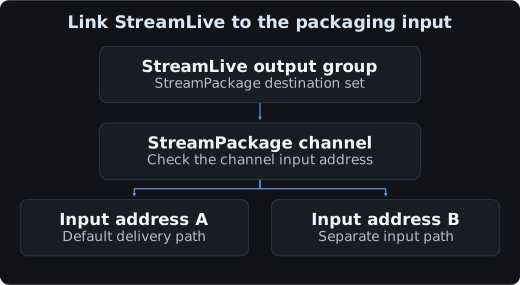
- If you plan to integrate StreamLive, you need the packager channel ID to specify in the output group. You can look it up after creating the channel.
1. Create a Channel
- Select the working region in the console.
- Select Create Channel.
- Set the channel name to
demo_packageand the input protocol to HLS. - Review the segment and playlist duration limits, then select Create.
| Item | Meaning | What to verify when configuring |
|---|---|---|
| Input Protocol | The protocol of the stream entering the channel | Must match the HLS or DASH configuration on the publishing side |
| Max Segment Duration | The maximum length of segments to accept | The official documentation default is 15 seconds. Set it to accommodate the actual published segment length |
| Max Playlist Duration | The maximum total length of the playlist to accept | The official documentation default is 600 seconds. Verify it against the total duration of the input playlist |
When using primary / backup inputs, the official documentation recommends setting Max Segment Duration slightly above the actual segment length.
2. Check the Channel ID and Inputs
Under Details in the channel details, check the name, ID, and input protocol. Input is the ingest address, Output Endpoint is the playback address, and CDN is the tab for verifying the distribution binding.


The resource names and IDs in the screenshots are examples for illustrating the screens. Use the values of the channel you are actually working on. The input addresses are redacted.
Having two inputs means two ingest paths are provided. To verify redundancy, you must also confirm whether the publishing system sends the signal to both paths, and whether timestamps and playback continue after a switchover.
3. Connect the Publishing System
| Publishing method | Destination to enter | Where to configure |
|---|---|---|
The HLS_STREAM_PACKAGE output of StreamLive | The StreamPackage channel ID | The destination of the StreamLive output group |
| An external HLS publishing system | The input URL copied from the console and the required HTTP credentials | The transport settings of that publishing system |
For a StreamLive-dedicated output group, specify the StreamPackage channel ID. External publishing uses the input URL.
4. Input Authentication
You can configure HTTP authentication under Authentication on the Input tab. If you enable authentication, you must also apply the corresponding user name and password on the publishing system.
- Input HTTP authentication controls who may push the stream in.
- The endpoint AuthKey is a separate authentication setting that uses the
X-TENCENT-PACKAGEheader. - CDN URL signing for viewers is a separate authentication policy of CDN.
Input authentication, endpoint authentication, and CDN authentication are applied separately on their respective legs.
Running Rotate credentials invalidates the existing credentials. During production publishing, plan the credential change on the publishing side together with the time it takes effect.
5. Verify Ingest After Creating an Endpoint
- Create a HLS playback address following Endpoint configuration.
- Send a stream from the publishing system to this channel.
- Fetch the playlist at least twice and confirm that the media sequence or the segment list is advancing.
- Request the segments listed in the playlist and verify the video and audio in a player.
Check the input URL, protocol, HTTP authentication, and publishing state, then inspect input ingest along with playlist updates and cached responses.
Creating and Querying with API
Run these in an environment where TCCLI authentication is configured. The create command provisions a new resource.
tccli mdp CreateStreamPackageChannel --region ap-seoul --Name demo_package --Protocol HLSTake the ID from the create response and apply it to the next command.
tccli mdp DescribeStreamPackageChannel --region ap-seoul --Id REPLACE_CHANNEL_IDCopy the input address from the API query response or from the console.
Distinguishing the Cache Settings
The channel's segment / playlist duration limits, the cache-related settings of API, the CDN TTL, and the player buffer are all different layers.
Because a live playlist keeps changing, repeatedly receiving only cached responses can push the playback position backward. Check the CDN TTL and cache key, the cache headers in the responses, and how the playlist changes across consecutive fetches, all together. Before changing the API field, check the unit and the target it applies to in the definition of the API version you are using.
Wrapping Up and Cleaning Up
After testing, stop publishing and clean up in the order of the CDN binding, the endpoint, and the channel. Verify the resource IDs and their usage / reference relationships before proceeding.